Android MDM Background Location Tracking: Why Foreground-Only APIs Miss Most of the Shift

Your MDM platform reports device location. What it does not tell you is how much of the shift that location data actually covers.

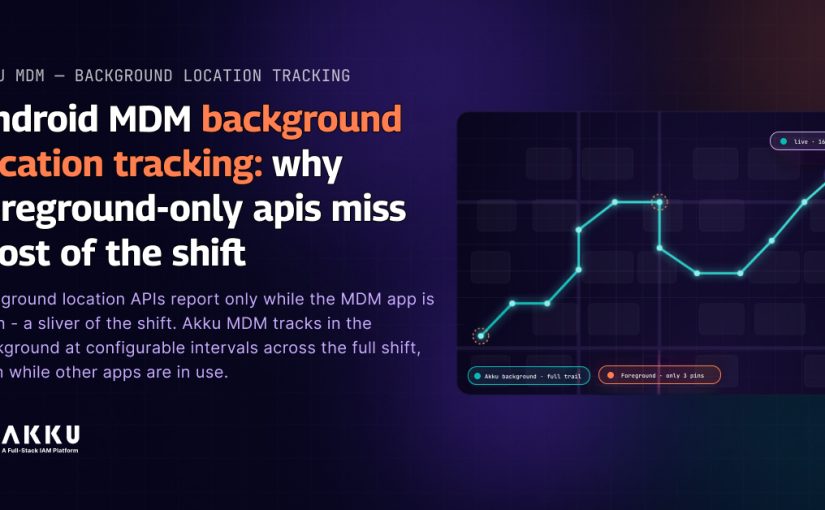
Android distinguishes between foreground location and background location at the API level. Foreground location APIs deliver updates while the requesting application is the active process on the device screen. The moment the user switches to another application, the MDM app moves to the background and foreground location updates stop. For a field employee who opens the MDM app once at the start of their shift and then works through a delivery app, a warehouse management system, or a customer service application for the rest of the day, the MDM platform’s location data ends shortly after the shift begins.

This is not a configuration gap or a connectivity issue. It is an architectural characteristic of how Android manages location access for applications that are not in the foreground. The distinction between foreground and background location access is enforced at the operating system level through Android’s permission model and process lifecycle management. 

The consequence for IT teams managing field device fleets is that the location compliance picture the MDM dashboard presents is accurate for the brief window when the MDM app is actively in use and incomplete for the majority of the working shift. For organisations where device location data underpins workforce compliance, client contractual obligations, or regulatory requirements around where corporate data is being accessed, the gap is operational rather than theoretical.

This blog covers how Android’s location API architecture creates this gap, what foreground-only location tracking produces as a dataset versus what background location tracking produces, and how Akku MDM’s background location tracking capability closes the gap with configurable reporting intervals across the full shift.

How Android Location APIs Work: The Foreground and Background Distinction 

Android’s location subsystem is built around two distinct access modes that carry different permission requirements and different OS-enforced behaviours. 

Foreground Location Access

An application that holds the ACCESS_FINE_LOCATION or ACCESS_COARSE_LOCATION permission can request location updates while it is the active foreground application. Android delivers these updates at the requested interval as long as the app remains in the foreground. When the user navigates away from the app, the process moves to the background and the OS restricts or suspends the location update stream. Applications that declare a foreground service can maintain location access while backgrounded, but the foreground service notification is visible to the user and the service consumes battery proportionally to the update frequency.

Standard MDM clients that use foreground location access without a persistent foreground service produce location data only during active app use. For device management workflows where administrators periodically open the MDM app to check in, this means location data is available at the moment of each check-in and absent between them. The result is a sparse dataset of point-in-time locations rather than a continuous track of device position throughout the shift.

Background Location Access

ACCESS_BACKGROUND_LOCATION is a separate, more restrictive Android permission that allows an application to receive location updates even when it is not in the foreground. Android 10 introduced this as a distinct permission requiring explicit user grant. Android 11 and later further restricted background location access: it cannot be requested at the same time as foreground location. The user must first grant foreground location, then separately grant background access through the system settings, where the option reads explicitly as ‘Allow all the time’ rather than ‘While using the app.’

Applications with background location access can use Android’s WorkManager, AlarmManager, or a persistent background service to request location updates at configurable intervals throughout the device’s operational period, regardless of which application the user has open. The location data produced is a continuous track rather than a sparse set of check-in points. Battery consumption is proportional to the reporting interval and can be managed by configuring a longer interval for non-time-sensitive use cases.

What Foreground-Only Location Tracking Produces as a Dataset

For a field employee running an eight-hour shift, a foreground-only MDM location implementation produces a dataset that looks like this: location recorded at app open at shift start, location recorded at any subsequent manual check-in or app interaction, location recorded at shift end. The hours between those interactions produce no location data.

The dashboard shows the device as compliant because the enrollment state is active and the last known location is within an expected range. What the dashboard does not show is that the last known location is two hours old and the device may have been anywhere in the interim. For organisations managing field employees who handle sensitive physical assets, access restricted customer locations, or operate in environments where real-time device location is a contractual or regulatory requirement, a two-hour-old location data point is not location tracking. It is a check-in log.

The gap matters differently depending on the use case. For healthcare organisations where clinical staff carry devices with access to patient data, a foreground-only location implementation cannot verify that the device remained within the permitted care environment throughout the shift. For ITeS and BPO organisations with client data handling obligations that include location-based access restrictions, a sparse location dataset does not satisfy the continuous compliance requirement. For logistics and field operations where route adherence and location verification are operational requirements, foreground-only tracking produces data too sparse to be operationally useful.

What Akku MDM’s Background Location Tracking Delivers

Akku MDM’s background location tracking for Android uses the ACCESS_BACKGROUND_LOCATION permission combined with a configurable periodic location worker. The worker runs at an administrator-defined interval throughout the device’s operational period, independent of which application is active on the device screen. Location updates are reported to the Akku MDM console in real time and stored with device identifier, timestamp, latitude and longitude coordinates, and accuracy radius.

The administrator console displays the continuous location track for each enrolled device, showing position at each reporting interval throughout the shift rather than at manual check-in points. For a device running a thirty-minute reporting interval over an eight-hour shift, the administrator receives sixteen location data points covering the full operational period. For environments requiring tighter tracking, shorter intervals are configurable.

The background location capability integrates with Akku MDM’s existing compliance monitoring and group-based policy framework. Administrators can apply background location tracking as a policy to specific device groups, specific user groups within the organisation, or the full enrolled device fleet. Devices that do not grant the background location permission can be flagged as non-compliant in the Akku MDM compliance dashboard, triggering the existing non-compliance workflow. 

The location data produced by background tracking feeds into the same centralised reporting that Akku MDM uses for audit readiness. For compliance exercises requiring evidence that corporate devices remained within permitted locations throughout a defined period, the background location track provides the continuous timestamped dataset that foreground-only check-in logs cannot.

The Permission Grant Process and User Experience

Because Android requires background location to be granted through a separate, explicit user action, the enrollment and permission grant workflow requires specific handling. Akku MDM’s Android enrollment flow presents the foreground location permission request as part of initial device enrollment. After the foreground permission is granted, the enrollment flow directs the user to the system settings to grant the ‘Allow all the time’ background location permission.

The user-facing explanation presented at this step is configurable by the administrator. For corporate-owned devices where the organisation controls the device use policy, the background location requirement can be stated as a condition of device enrollment. For BYOD devices, the permission grant remains subject to the user’s acceptance, and the MDM can be configured to flag devices where background location permission has not been granted as having a policy exception rather than as enrollment-blocked.

This distinction between corporate-owned and BYOD handling reflects the broader Akku MDM architecture, which maintains work profile isolation on Android to separate corporate data from personal data. Background location tracking applies to the device as a whole rather than to the work profile, which means the permission grant and the privacy disclosure to the user need to be consistent with the organisation’s BYOD policy.

The Compliance Context

For healthcare organisations managing Android devices that carry access to patient data, continuous location tracking supports the requirement to demonstrate that protected health information was accessed only from permitted locations. HIPAA does not specify a location tracking requirement for devices, but organisations that use location-based access controls as a technical safeguard under HIPAA Section 164.312(a)(1) need the location data to be continuous rather than sparse to satisfy the control.

For ITeS and BPO organisations with client contractual requirements around where data can be accessed, background location tracking provides the continuous location evidence that spot-check foreground logs cannot. For field operations and logistics environments where device location tracking is an operational requirement tied to route compliance and asset tracking, background location data at configurable intervals produces the operational dataset the use case requires.

Under DPDPA Rules 2025, the collection of background location data from employee devices constitutes processing of personal data. Organisations implementing background location tracking are required to ensure that the processing is based on a legitimate purpose, that employees are informed of the tracking, and that the data is retained only for the period necessary for the stated purpose. Akku MDM’s group-based policy model supports scoping background location tracking to specific device groups, allowing organisations to apply tracking only to the roles and use cases where it is operationally justified rather than to the entire enrolled fleet. 

What to Check in Your Current MDM Location Configuration

Open your MDM console and pull the location history for three enrolled Android devices used by field employees. Count the number of location data points recorded during a standard eight-hour shift. If the count is in single digits, the MDM is using foreground-only location access. The location compliance dashboard is showing you check-in points, not continuous shift coverage.

Check the Android permission state for the MDM app on those devices. If the location permission shows as ‘While using the app’ rather than ‘Allow all the time’, background location access has not been granted. The MDM platform is architecturally limited to foreground-only reporting. For environments where continuous location coverage is operationally or contractually required, Akku MDM’s background location tracking capability closes the gap without requiring a change to the device management model.

Explore Akku MDM Capabilities  |  Talk to the Akku Team 

Questions IT and Security Teams Ask About Android MDM Background Location Tracking

Q: What is the technical difference between ACCESS_FINE_LOCATION and ACCESS_BACKGROUND_LOCATION on Android?

A: ACCESS_FINE_LOCATION grants an application the ability to receive precise location updates from GPS and network sources. It is classified as a foreground permission on Android 10 and later, meaning it allows location access only while the app is in the foreground or while a foreground service is running with the location foreground service type declared. ACCESS_BACKGROUND_LOCATION is a separate permission that extends location access to background operation, allowing the app to receive location updates regardless of whether it is the active foreground application. Android 11 and later require this permission to be granted separately through system settings, where the user explicitly selects ‘Allow all the time’ rather than ‘While using the app.’ The two permissions have different grant flows and different battery impact profiles.

Q: How does Akku MDM implement background location reporting without draining the device battery?

A: Akku MDM’s background location worker uses Android’s WorkManager with a configurable periodic task interval. WorkManager is battery-optimised by design: it batches work requests with other background operations and respects Android’s Doze and App Standby restrictions while still delivering location updates at the configured interval. Administrators set the reporting interval based on operational requirements. A thirty-minute interval produces sixteen data points over an eight-hour shift with minimal battery impact. Shorter intervals are available for environments requiring tighter tracking, with the understanding that battery consumption scales with reporting frequency.

Q: What happens to the background location track if the device loses connectivity mid-shift?

A: Akku MDM’s location worker stores location events locally on the device when the MDM platform is not reachable. On connectivity restoration, the stored events are uploaded to the Akku console with their original timestamps. The location track in the admin console reflects the full shift coverage, including the offline period, not just the connected periods. This is relevant for field environments where network connectivity is intermittent, such as warehouses with coverage gaps or field sites outside urban areas.

Q: How does DPDPA apply to background location tracking of employee devices?

A: Under DPDPA Rules 2025, background location tracking of an employee’s Android device constitutes processing of personal data. The data fiduciary, which is the employing organisation, is required to ensure the processing is based on a legitimate purpose, that the employee is informed of the tracking, and that the data is not retained beyond the period necessary for the stated purpose. For corporate-owned devices, the employment agreement and device use policy can establish the legitimate purpose and notification requirement. For BYOD devices, the explicit permission grant required by Android for background location access serves as part of the user notification, but the organisation should ensure the permission request is accompanied by a clear explanation of what data is collected, how it is used, and how long it is retained.

Q: Can background location tracking be applied to specific device groups rather than the entire enrolled fleet?

A: Yes. Akku MDM’s group-based policy assignment allows background location tracking to be applied at the organisational unit or user group level. An administrator can enable background location for field operations devices while leaving office-based devices on foreground-only location or no location tracking. This allows the organisation to scope continuous location tracking to the roles and use cases where it is operationally justified and to maintain a clear, defensible basis for the processing under DPDPA and similar data protection requirements.

Q: How does background location tracking interact with Akku MDM’s work profile isolation on BYOD devices?

A: Work profile isolation on Android separates corporate applications and data from personal applications and data within the same device. The work profile runs as a separate user space, but location services operate at the device level rather than at the profile level. Background location tracking granted to the Akku MDM app applies to the device as a whole, not only to the work profile. This means background location data is collected from the full device, not only from work profile activity. For BYOD deployments, this distinction should be addressed explicitly in the device use policy and the permission grant flow, so that employees understand the scope of location data being collected before granting the permission.
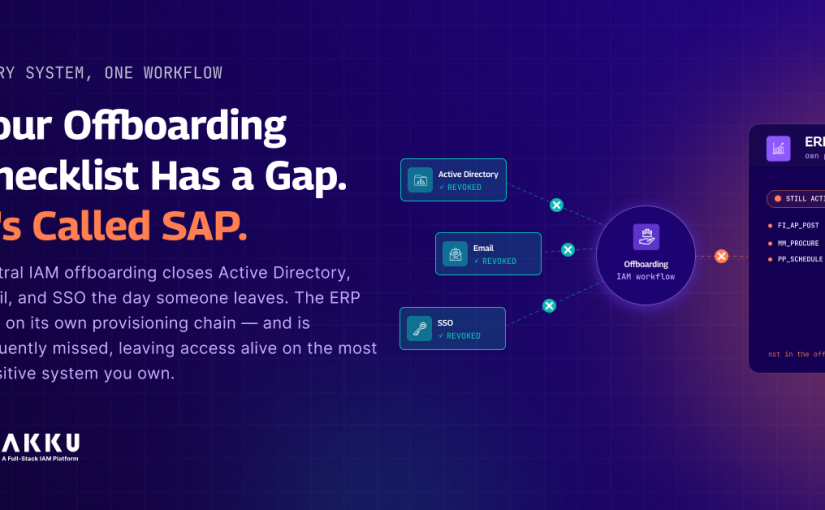
Your Offboarding Checklist Has a Gap. It’s Called SAP.

What is the most sensitive system in your organisation? Not the most technically complex. The one with the highest concentration of data that would cause the most damage if a former employee retained access to it after leaving.

For most manufacturing, financial services, and retail organisations, the answer is SAP. The general ledger. Accounts payable. Supplier pricing. Production schedules. Customer master data. Financial reporting. All of it was governed, transacted, and stored in an ERP system that was running before your IAM platform existed and is still running outside your IAM platform’s provisioning scope.

When an employee leaves, your central IAM offboarding workflow closes their Active Directory account, disables their email, revokes their SSO access, and produces a ULM deprovisioning record showing that access was removed on the date of departure. The offboarding record looks complete.

The SAP account is still active.

Not because the SAP Basis team forgot. Because SAP user management was never connected to the central IAM offboarding workflow. The notification has to travel from HR to IT to the SAP Basis team manually. Whether it arrives, how quickly it is acted on, and whether the deprovisioning is verified are entirely dependent on a manual communication chain that breaks regularly and leaves no evidence when it does.

This blog covers why SAP sits outside most identity governance architectures, what that gap looks like under ISO 27001, SOC 2, DPDPA, and RBI, and what connecting SAP to the central IAM offboarding workflow produces as evidence and security outcome. 

Why SAP Is Structurally Excluded From Most IAM Governance

SAP has its own user administration layer. SU01 manages individual user accounts. Role assignments are handled through the SAP role framework, separate from the RBAC model in the central directory. Authentication in SAP can run through SSO but frequently does not, or runs through a different SSO configuration than the one the central IAM platform manages.

In most organisations, SAP was deployed by a dedicated implementation team, maintained by a SAP Basis function, and governed by a separate access control process owned by the SAP team rather than the IAM team. The central IAM platform manages every application in the SSO catalogue. SAP is not in the SSO catalogue. It is a separate system with separate credentials, separate role management, and separate access review processes.

The result is a fundamental governance architecture gap. The identity governance layer that is supposed to cover all access to sensitive systems does not cover the system that holds the most sensitive data. The access review that runs quarterly for every application in the IAM platform runs separately for SAP, on a different cadence, producing evidence in a different format, reviewed by a different team.

For auditors evaluating ISO 27001 A.8.4 access review coverage or SOC 2 CC6.3 access authorisation, the question of whether SAP was included in the access review scope is a material one. The answer in most organisations is that it was not, or that it was covered by a separate process whose evidence is not connected to the central access governance record.

What the Gap Creates Operationally 

The Offboarding Gap 

ISO 27001:2022 Annex A Control A.11.5 requires that responsibilities after termination include access revocation across all information systems. The evidence requirement is a User Lifecycle Management offboarding report showing immediate access revocation upon termination. The report must show all systems, not the systems managed by the central IAM platform.

For a manufacturing organisation where SAP governs procurement, production planning, and financial operations, a former employee with active SAP credentials after departure has access to supplier contracts, pricing negotiations in progress, production schedules that constitute competitive intelligence, and the ability to execute financial transactions. The ISO 27001 A.11.5 evidence gap is also an active security exposure.

DPDPA Section 8(7)(a) requires data fiduciaries to restrict processing of personal data when the lawful basis for processing ends. For employees, the lawful basis is the employment relationship. A SAP account active after departure is an active processing capability on data for which the lawful basis has ended. The DPDPA obligation is not satisfied by the central IAM offboarding record if that record does not cover SAP.

The Access Review Gap

SOC 2 CC6.3 requires that access is authorised, modified, or removed based on roles and responsibilities. For a SOC 2 Type II audit, the auditor evaluates whether access modifications occurred when role changes occurred. If an employee changed departments and their SAP roles were not updated to reflect the new role’s access requirements, the CC6.3 control has a gap for the full period during which the misaligned access existed. 

For financial services organisations where SAP governs general ledger operations, RBI Cybersecurity Framework clause 19(a) requires access to information assets to be allowed only where a valid business need exists and mandates documented standards for need-based access to information systems. SAP access that was granted for a role that no longer exists, or retained after a role change, fails this standard. The access review that would catch it runs on a different cadence and produces evidence that is not connected to the central access governance record.

The Segregation of Duties Gap

SAP role assignments accumulate over time. A user who was given a procurement role when they joined the organisation may have accumulated finance and reporting roles through ad-hoc requests over the years. In most organisations, the SAP access review that would catch this runs less frequently than the central IAM access review and uses a different reviewer and a different evidence format.

The consequence is that segregation of duties violations, where a single user has incompatible roles that they should not hold simultaneously, accumulate invisibly in SAP while the central access governance layer shows clean reviews. The compliance posture looks clean because the governance layer is not covering the system where the violations exist.

What Connecting SAP to the Central IAM Workflow Produces

Akku’s User Lifecycle Management supports SAP as a provisioning and deprovisioning target through SCIM-based and API-based connectors. When an offboarding event is triggered in Akku, the deprovisioning action executes across all connected systems simultaneously, including SAP. The SAP account is disabled as part of the same workflow that handles Active Directory, email, and SSO access removal.

The ULM offboarding record captures the timestamp of deprovisioning across every connected system in a single audit trail entry. For an ISO 27001 A.8.2, A.11.5, or SOC 2 CC6.3 audit, the evidence is a single record showing that access was removed from all systems, including SAP, at the time of the offboarding event. The gap between the central IAM offboarding completion and the SAP account deactivation is zero because both actions happen within the same workflow execution.

Akku IGA‘s access recertification capability extends to SAP role assignments when SAP is connected to the IAM governance layer. SAP roles are included in the quarterly access review alongside every other application. The reviewer sees the user’s current SAP roles, the business justification for each, and the date of last review. The access recertification report covers SAP as part of the standard evidence set. The gap between the central access governance record and the SAP access state closes.

The Verification Test

For the last three employees who left your organisation, answer these two questions. First: Does the central IAM offboarding record show SAP account deactivation with a timestamp? If the answer is no, SAP is not in the offboarding workflow. Second: What is the timestamp difference between the central IAM offboarding completion and the SAP account deactivation?

If SAP deactivation is not in the central record, the access may still be active. If the timestamp difference is more than a few hours, the manual communication chain between the IT and SAP Basis teams introduces a gap that is not visible in the offboarding record. For manufacturing organisations and financial services organisations where SAP access is access to the most sensitive operational data in the environment, that gap is not a paperwork problem. It is an active access exposure.

 Explore Akku IGA Capabilities  |  Talk to the Akku Team

Questions IT and Compliance Teams Ask About SAP Offboarding and Access Governance 

Q: Why does SAP sit outside most central IAM platforms architecturally?

A: SAP has its own user administration layer, separate from the directory services and SSO-based authentication that most central IAM platforms manage. In most organisations, SAP was deployed before the central IAM platform and by a different team, establishing SAP user management as a separate process owned by the SAP Basis function. Integrating SAP into the central IAM provisioning and deprovisioning workflow requires a SCIM connector or API-based integration that most organisations have deferred. The result is that SAP access operates under separate governance from the rest of the identity estate, with a different access review cadence, different evidence format, and different ownership.

Q: What evidence does ISO 27001 A.11.5 require for SAP account deactivation on employee departure? 

A: ISO 27001:2022 Annex A Control A.11.5 requires that responsibilities after termination include access revocation across all information systems. The evidence required is a User Lifecycle Management offboarding report filtered for deprovisioning events showing immediate access revocation upon termination. For SAP specifically, the evidence requires that SAP account deactivation is captured in the same offboarding record as all other system access removals, with a timestamp showing deactivation occurred at the time of termination. A SAP deactivation that occurs days after the central IAM offboarding, or is not documented in the central record at all, is a gap in the A.11.5 evidence. 

Q: How does DPDPA apply to SAP access retained by departed employees?

A: DPDPA Section 8(7)(a) requires data fiduciaries to restrict processing of personal data when the specified purpose is no longer served. For employee data processed in SAP, the employment relationship is the lawful basis for processing. When the employment relationship ends, the lawful basis ends and the obligation to restrict further processing applies. A SAP account active after an employee’s departure is an active processing capability on data for which the lawful basis has ended. Section 8(7)(b) extends this requirement to downstream processors. An organisation that has not connected SAP to its central deprovisioning workflow cannot demonstrate that the DPDPA data erasure and processing restriction obligations were met at the time of departure. 

Q: What SOC 2 controls are most directly affected by SAP role accumulation and access review gaps? 

A: SOC 2 CC6.3 requires that access is authorised, modified, or removed based on roles and responsibilities. SAP role accumulation over time, where users hold roles beyond their current business function, is a direct CC6.3 finding. SOC 2 CC5.1 requires controls to mitigate risks, which includes segregation of duties controls. Incompatible SAP role combinations that exist because access review has not covered SAP role assignments are a CC5.1 finding. For a SOC 2 Type II audit, the question is whether these controls operated throughout the audit period. A SAP access review that runs less frequently than the central IAM access review creates a gap in the Type II evidence record.

Q: How does Akku connect SAP to the central IAM access review process?

A: When SAP is connected to the Akku IAM platform through a SCIM or API-based connector, SAP users and role assignments become visible in the Akku IGA governance layer. Akku IGA’s access recertification capability extends to SAP roles, including them in the quarterly access review alongside every other application. Reviewers evaluate SAP role assignments against the current business justification, and the access recertification report covers SAP as part of the standard evidence set. Role accumulation and segregation of duties violations in SAP become visible in the same review process that governs all other application access.

Q: What does the ULM offboarding record look like when SAP is connected to Akku?

A: When SAP is connected to Akku’s User Lifecycle Management, the offboarding workflow executes deprovisioning actions across all connected systems simultaneously. The ULM offboarding record captures a single timestamped entry showing the user identity, every system from which access was removed, and the timestamp of removal for each system. SAP account deactivation appears in the same record as Active Directory, email, and SSO access removal. The timestamp for SAP deactivation matches the offboarding event timestamp rather than reflecting a delay introduced by a manual notification chain.

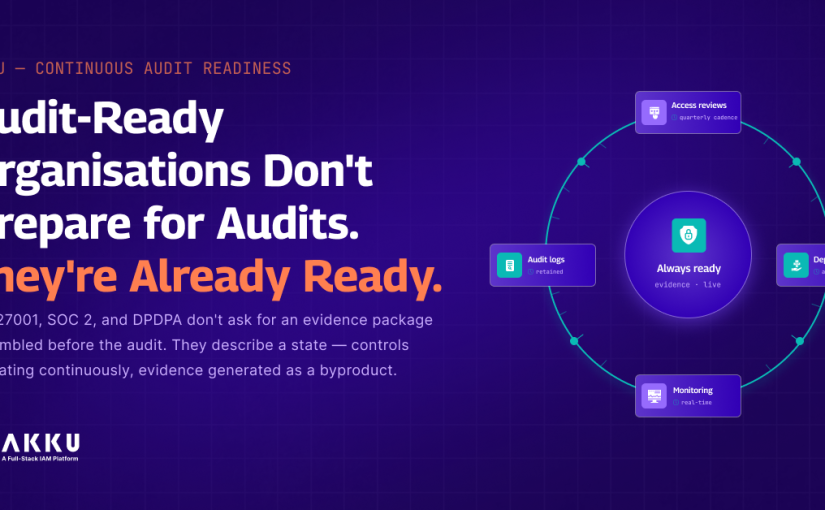
Audit-Ready Organisations Don’t Prepare for Audits. They’re Already Ready.

Here is a question worth asking your compliance team: how long would it take to produce the evidence package for your next ISO 27001 or SOC 2 audit if the auditor announced it today?

If the answer is measured in weeks, your organisation is not compliant. It is compliant-looking, periodically, when someone assembles the evidence. The compliance posture that exists between audit cycles, the one where access reviews are delayed, deprovisioning records are incomplete, and monitoring logs are available but unreviewed, is the actual posture. The packaged evidence is a retrospective reconstruction of something that may or may not reflect how controls operated during the period.

ISO 27001:2022 Clause 9.1 requires monitoring and measurement to evaluate ISMS effectiveness, with retained evidence. It does not say evidence assembled before the audit. SOC 2 CC7.2 requires continuous monitoring of system components for anomalies. DPDPA Section 10(2)(c)(ii) requires periodic audit measures for significant data fiduciaries. RBI Cybersecurity Framework clause 30(f) specifically describes a continuous auditing approach for critical systems.

None of these frameworks describes a quarterly scramble. They are describing a state. This blog covers what that state looks like architecturally, why most organisations are not in it, and what changes when the evidence is generated continuously rather than assembled on demand.

The Difference Between Compliance and Compliance-Looking

Compliance, in the sense that ISO 27001, SOC 2, and DPDPA mean it, is an operational state. The controls are configured correctly. Access reviews run at the required cadence. Deprovisioning happens when it is supposed to happen. Monitoring is active. The evidence of each of these exists in the system as a byproduct of the controls operating.

Compliance-looking is a documentation state. The evidence package submitted to an auditor accurately represents what the controls looked like during the evidence collection period. Whether the controls operated that way for the other ten months of the year is not visible in the package.

The practical distinction is who bears the risk. In a genuine compliance posture, gaps are discovered when they occur, because monitoring is active. In a compliance-looking posture, gaps are discovered during audit preparation, when the window for remediation has closed. A deprovisioning that was missed three months ago cannot be remediated retroactively. An access review that did not run in Q2 cannot be backdated to show that it did.

The evidence quality standard that ISO 27001 Type II and SOC 2 Type II audits are moving toward reflects this distinction. Auditors are increasingly looking not just at the evidence submitted but at whether the controls that produced the evidence were operating throughout the audit period. A quarterly access review completed once in the last week of the period is weaker evidence than four access reviews completed at regular intervals.

What Each Framework Actually Requires

ISO 27001:2022 Annex A and Clause 9 

Annex A Control A.8.4 requires periodic review of user access rights, with documentation of the review. Periodic implies a cadence that runs regardless of audit timing. The Akku IGA access recertification report satisfies this requirement when it is generated at the defined cadence and stored in the audit log. The report captures the reviewer identity, the access scope reviewed, the timestamp, and the decision made for each entitlement.

Annex A Control A.8.2 requires access rights to be removed when employment terminates. The evidence is a User Lifecycle Management offboarding record with a timestamp showing that access was removed at the time of the termination event, across all connected systems. A record produced at the time of the event is different from a record assembled in response to an auditor’s request.

Clause 9.1 requires the organisation to retain evidence of monitoring and measurement results. This is the catch-all: the audit log exports, the access monitoring reports, the authentication event records. They need to exist as a continuous output of the controls operating, not as exports triggered by audit preparation.

SOC 2 Trust Services Criteria

SOC 2 CC6.3 requires that access is authorised, modified, or removed based on roles and responsibilities. The Type II audit evaluates whether this control operated throughout the audit period. The evidence is the access change log showing that modifications and removals occurred when the corresponding role changes and departures occurred, not at a point in time near the audit window. 

SOC 2 CC7.2 requires monitoring of system components for anomalies indicative of malicious acts. The Akku PAM session recordings and security monitoring alerts contribute to this evidence base when they are generated continuously as an operational output. An anomaly detected in real time and logged in the audit trail is different evidence from an anomaly that would have been detectable if someone had reviewed the logs.

DPDPA Rules 2025

DPDPA Section 8(4) requires data fiduciaries to implement appropriate technical and organisational measures to ensure effective observance of the Act. At the access governance level, the evidence is the IGA access review records and the ULM deprovisioning records demonstrating that access to personal data systems was reviewed periodically and revoked when the basis for access ended.

For organisations classified as significant data fiduciaries, Section 10(2)(c)(ii) requires periodic audit measures. The evidence base for that audit is the access governance records generated during the audit period. An IGA access recertification report generated three weeks before the audit is weaker evidence than four quarterly reports generated throughout the year.

RBI Cybersecurity Framework 

RBI clause 15(a) requires IT applications with access to critical or sensitive information to have audit and system logging capability, providing audit trails. Clause 15(c) requires a system for regularly monitoring audit trails and system logs to detect unauthorised activity. Clause 30(f) describes continuous auditing for critical systems as a recommended approach for regulated entities.

These requirements together describe an architecture where critical system access is logged, the logs are monitored continuously, and the monitoring produces evidence that can be queried at any time. Akku’s centralised audit log and identity and access security monitoring satisfy clauses 15(a) and 15(c). The Compliance Reporting API consolidates compliance data across authentication events, GPO configuration state, and threat detection activity into a structured JSON output that GRC platforms and SIEM tools can consume programmatically.

What Continuous Audit Evidence Looks Like in Practice

Access Reviews That Run on a Schedule, Not on Request

Akku IGA generates access recertification campaigns at configured intervals. Each campaign produces a report documenting the review timestamp, reviewer identity, scope, and decisions. The reports are stored in the audit log and are queryable by date range and application. A compliance manager preparing for an audit queries the IGA access recertification history and retrieves four quarterly reports. The question of whether the access reviews ran during the period is answered by the data, not by the compliance manager’s recollection.

Deprovisioning That Happens When the Event Happens

Akku’s User Lifecycle Management generates a timestamped deprovisioning record for every offboarding event, capturing the user identity, the systems from which access was removed, and the timestamp of removal. The record is written at the time of the event. When an auditor asks for evidence that a specific departed employee’s access was revoked, the query returns a record with a timestamp that either matches the departure date or does not. There is no room for reconstruction.

Current compliance Visibility, Not Assembled

Akku’s Compliance Control Checkpoints View shows the real-time pass/fail status of every compliance control with the timestamp of the most recent supporting evidence. The Compliance Score generates an organisation-wide score with per-framework breakdowns across ISO 27001, SOC 2, HIPAA, GDPR, and DPDPA, updated as controls are remediated. A compliance manager reviewing the dashboard on any given day sees the current state of every control, not the state as of the last evidence collection exercise.

The Diagnostic Question

For each framework your organisation is subject to, ask this: if the auditor requested the evidence package today, how much of it already exists in a timestamped, queryable format in your systems? For financial services organisations under RBI’s audit trail requirements and for ITeS and BPO organisations under client compliance obligations, the gap between what exists continuously and what would need to be assembled is the gap between a compliance posture and a compliance-looking posture.

If the answer requires assembling anything, the architecture is reactive. The evidence is available somewhere. It is not maintained as a continuous operational output.

Explore Akku IGA Capabilities  |  See Akku Compliance Reporting API  |  Talk to the Akku Team

Questions Compliance and IT Teams Ask About Continuous Audit Readiness

Q: What is the practical difference between ISO 27001 Type I and Type II audit evidence standards?

A: A Type I assessment evaluates whether controls are designed appropriately at a point in time. A Type II assessment evaluates whether those controls operated effectively throughout a defined period, typically six to twelve months. The evidence standard for Type II is significantly higher: the auditor is looking for a pattern of operation over time, not a snapshot. A quarterly access review completed once in the final week of the audit period satisfies neither the spirit nor the letter of a Type II assessment. Four quarterly reviews conducted at regular intervals throughout the period do. This distinction is why the architecture that generates evidence continuously is not optional for organisations pursuing SOC 2 Type II.

Q: How does Akku’s Compliance Reporting API differ from a standard audit log export? 

A: A standard audit log export is a raw output from a single system, typically requiring manual filtering, formatting, and cross-referencing with other systems before it is useful as compliance evidence. Akku’s Compliance Reporting API consolidates compliance-relevant data across authentication events, GPO configuration state, threat detection activity, and access change records into a single structured JSON endpoint. The output is timestamped, audit-traceable, and formatted for direct ingestion by GRC platforms and SIEM tools. It does not require a human to assemble it. It is generated programmatically and is current as of the moment it is queried.

Q: What evidence does Akku IGA produce for ISO 27001 A.8.4 access review requirements?

A: Akku IGA generates access recertification reports documenting each periodic review of user access rights. Each report captures the review timestamp, the reviewer identity, the access scope reviewed, and the decision made for each entitlement under review. The reports are stored in the Akku audit log and are queryable by date range, application, and reviewer. For a twelve-month audit period with quarterly access reviews, the auditor receives four timestamped reports from the audit log. The evidence demonstrates both that the reviews occurred and that they occurred at the required cadence.

Q: How does DPDPA Section 10(2)(c)(ii) apply to organisations that are not classified as significant data fiduciaries?

A: Section 10(2)(c)(ii) requires periodic audit measures specifically for significant data fiduciaries, which are organisations designated by the government as processing large volumes of personal data or data that poses a significant risk to data principals. Organisations not classified as significant data fiduciaries are not subject to this specific requirement. However, Section 8(4) applies to all data fiduciaries and requires technical and organisational measures to ensure effective observance of the Act. At the access governance level, this requires access reviews and deprovisioning records for personal data systems regardless of significant data fiduciary status. The distinction is in the audit mechanism, not in the underlying access governance requirements.

Q: How does the Compliance Control Checkpoints View connect to the underlying evidence in the audit log?

A: The Compliance Control Checkpoints View displays the real-time pass/fail status of each compliance control derived from the evidence records in the Akku audit log. When a control shows a pass status, it is because the underlying evidence, such as a recent access recertification report, an active MFA configuration, or a completed deprovisioning record, exists in the audit log and meets the evidence standard for that control. When a control shows a fail or gap status, it is because the evidence does not exist, is outdated, or does not meet the standard. The dashboard is not a separate assessment layer. It is a view into the same evidence that would be submitted to an auditor.

Q: What RBI Cybersecurity Framework requirements does Akku’s continuous monitoring architecture satisfy? 

A: Akku’s centralised audit log satisfies RBI clause 15(a), which requires IT applications with access to critical information to have audit trail capability, and clause 15(b), which requires audit trails to be detailed enough to serve as forensic evidence. Akku’s identity and access security monitoring satisfies clause 15(c), which requires a system for regularly monitoring audit trails to detect unauthorised activity. For the continuous auditing approach described in clause 30(f), Akku’s Compliance Reporting API provides the programmatic, real-time access to compliance data that continuous auditing requires. The API output covers authentication events, GPO configuration state, and threat detection activity in a structured format suitable for automated analysis.

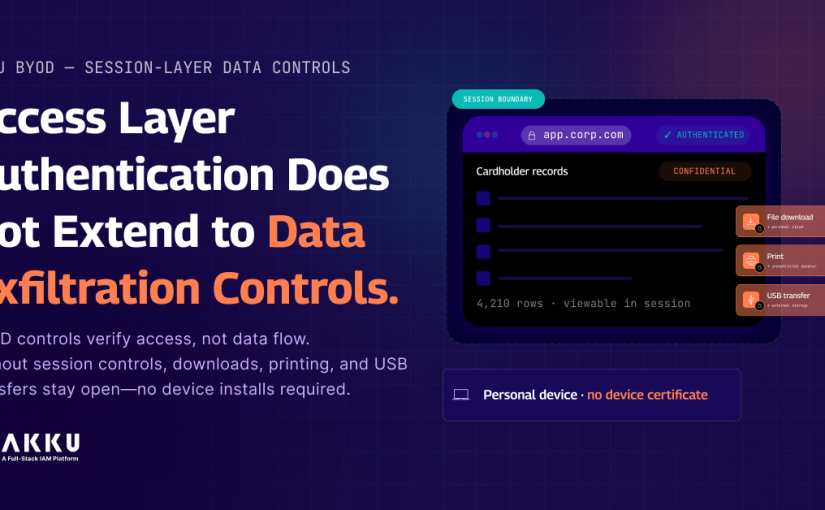
Access Layer Authentication Does Not Extend to Data Exfiltration Controls.

Your BYOD policy permits employees to access corporate applications from personal devices. The security team agreed to this because blocking personal device access was creating friction that hurt productivity. The IT team agreed because enforcing full MDM enrollment on personal devices was operationally impractical and legally contested in some jurisdictions.

What neither team thought through carefully enough: the moment an employee accesses a corporate application from a personal laptop and downloads a file, that file is on the personal device. Outside your data governance controls. Outside the MDM perimeter. Outside the DLP agent that was never installed on the personal laptop because the legal team objected to agent installation on personal devices.

The authentication was controlled. The identity was verified. The access was permitted. The data transfer was completely uncontrolled.

This is the BYOD exfiltration gap. It is not a niche scenario. It is the direct consequence of enabling access from unmanaged devices without implementing the controls that govern what those devices can do with the data they access.

This blog covers the three specific exfiltration vectors that BYOD access creates, why endpoint-layer DLP is not a practical solution for personal devices, and how device-based restrictions at the access layer close the gap without requiring anything to be installed on the personal device.

The Three Exfiltration Vectors BYOD Access Creates

File Download

When a user on a personal device downloads a file from a corporate application, the file leaves the corporate data environment. The application’s access controls governed who could view the file. They do not extend to what happens to the file once it is on the personal device. The file can be copied to a personal cloud storage service, forwarded from a personal email account, or transferred to any other system the personal device has access to.

Print

Printing from a corporate application on a personal device sends the document through the personal device’s print spooler and, in most cases, through a cloud print service the organisation does not control. For documents containing personal data under DPDPA, financial records under RBI requirements, or health information under HIPAA, a printout produced on a personal device through an uncontrolled print pathway is a data governance gap regardless of how the access was authenticated.

USB Transfer 

An employee with external storage connected to a personal laptop can copy data from a browser session directly to the USB device. USB transfer leaves no network trace. The data movement is entirely local. There is no network log entry, no application access log entry for the transfer itself.

For ITeS and BPO organisations handling client data under contractual data handling obligations, USB-accessible data on personal devices is a direct contractual exposure. 

Why Endpoint-Layer DLP Does Not Solve This for BYOD 

On corporate managed devices, DLP agents work. The organisation owns the device, manages it through MDM, and can install a DLP agent as part of the standard configuration.

On personal devices, endpoint DLP has three problems. Privacy objection: installing a DLP agent on a personal device gives the organisation monitoring capability over activity outside the work context. Most employees and most legal teams object to this. Operational complexity: maintaining DLP agents across a diverse estate of personally-owned devices with varying operating systems and configurations is disproportionately complex. User resistance: employees who experience monitoring software on personal devices resist it, reducing BYOD adoption and eliminating the productivity benefit that justified the policy.

The consequence is that most organisations with BYOD access policies have either no DLP coverage on personal devices or coverage so limited it does not address the primary exfiltration vectors.

How Device-Based Restrictions Work at the Access Layer

Akku’s device-based data exfiltration restrictions operate at the access layer rather than the endpoint layer. Rather than installing software on the personal device and monitoring what the device does, Akku enforces restrictions at the point where the user accesses the corporate application.

When a user authenticates from a device that is not on the organisation’s whitelisted device list, Akku applies the configured restrictions to that session: file downloads are blocked, print actions are blocked, and USB transfer pathways accessible from the session are restricted. The user can still view and work with content within the session. The restriction applies specifically to the actions that would move data out of the controlled session environment onto the personal device or to external media.

Nothing needs to be installed on the personal device. The restriction is enforced by the access platform at the session layer and is transparent to the personal device. 

Device Whitelisting and How It Determines Which Restrictions Apply

Akku uses certificate-based device authentication as the whitelisting mechanism. When a device is enrolled as an authorised device for a user, a certificate is installed on the device. When a user authenticates, Akku evaluates whether the device presents a valid certificate. Enrolled devices with valid certificates receive full data access. Devices without a certificate receive restricted session access.

The certificate approach is platform and browser agnostic, working across Windows, macOS, Linux, iOS, and Android without requiring a device-specific agent. The same user can have different data control policies depending on which device they authenticate from: full access from their enrolled corporate laptop, restricted session access from a personal device.

This is directly relevant for financial services organisations where field staff need access to client data from personal devices while the organisation needs to ensure sensitive financial data cannot leave through uncontrolled download or print pathways. It is equally relevant for healthcare organisations where clinical staff access patient records from personal devices and HIPAA requires that electronic protected health information is subject to access controls including controls over how it can be extracted.

The Compliance Case

GDPR Article 32 requires that personal data is processed with appropriate technical measures including protection against unauthorised disclosure. A download of personal data to a personal device with no data governance controls is an unauthorised disclosure pathway that Article 32 was designed to prevent. 

DPDPA Rules 2025 requires data fiduciaries to implement technical measures to protect personal data from unauthorised processing. An employee downloading personal data to a personal device and storing it in a personal cloud service is unauthorised processing under DPDPA.

PCI-DSS Requirement 12.3.3 requires that all hardware and software in scope for cardholder data is inventoried. A personal device from which cardholder data was downloaded is in scope for the cardholder data environment. Blocking download from personal devices is the technically cleaner path to compliance than attempting to bring personal devices into CDE scope. 

What to Check in Your Current BYOD Configuration

Pick any employee who accesses a corporate application containing sensitive data from a personal device. Without asking them, can your IT team confirm whether that employee has downloaded any files from that application to their personal device in the last 30 days? If the answer is no, the download activity is unmonitored and uncontrolled.

Can your organisation demonstrate to a DPDPA supervisory review or a client compliance audit that personal devices used to access corporate applications cannot transfer data to external storage or personal cloud services? If the answer requires relying on policy documentation rather than technical controls, the BYOD security posture is based on trust rather than enforcement.

Explore Akku BYOD Security  |  See Akku MDM Capabilities  |  Talk to the Akku Team

Questions Security and Compliance Teams Ask About Device-Based Exfiltration Restrictions

Q: Does enforcing exfiltration restrictions on personal devices require installing anything on those devices?

A: No. Akku’s device-based restrictions operate at the access layer. When a user authenticates from a device that does not present a valid device certificate, the session applies the configured restrictions without requiring any software on the personal device. The restriction is enforced by the access platform at the session layer and is transparent to the personal device.

Q: How does certificate-based device whitelisting work in practice? 

A: When a device is enrolled as an authorised device, Akku generates and installs a device certificate on the device. On subsequent authentication attempts, Akku evaluates whether the authenticating device presents a valid certificate. Enrolled devices with valid certificates receive the full configured data access. Devices without a certificate receive the restricted session access. The certificate is platform and browser agnostic, working across Windows, macOS, iOS, and Android without a device-specific agent.

Q: What specific actions can be restricted for unenrolled device sessions? 

A: The restrictions configurable for unenrolled device sessions include file download from corporate applications accessed through the session, print actions initiated from the session, and USB storage device transfer of data accessible in the session. Restrictions can be applied uniformly to all unenrolled device sessions or configured differently based on user group or application sensitivity.

Q: How does this address DPDPA Rules 2025 requirements specifically?

A: DPDPA requires data fiduciaries to implement technical measures to protect personal data from unauthorised processing. Downloading personal data to a personal device and storing it outside the organisation’s data governance controls constitutes unauthorised processing under DPDPA. Device-based download and transfer restrictions implement the technical measure at the data movement layer, preventing the unauthorised processing pathway rather than relying on policy documentation.

Q: How does this work for web-based corporate applications accessed through a browser?

A: The restrictions apply to web-based applications accessed through a browser on an unenrolled device. Akku manages the application access layer and applies session restrictions at that layer. File downloads through standard browser download mechanisms are blocked at the application delivery layer. Print actions initiated from the browser are restricted before the print dialog completes. 

Q: What is the user experience difference between an enrolled and an unenrolled device session?

A: On an enrolled device with a valid certificate, the user experience is identical to unrestricted application access. No additional friction. On an unenrolled personal device, the user can view and work with content within the session. Attempts to download files, initiate print actions, or transfer session data to external storage are blocked with an appropriate notification. The restriction applies specifically to the actions that would move data out of the controlled session environment.

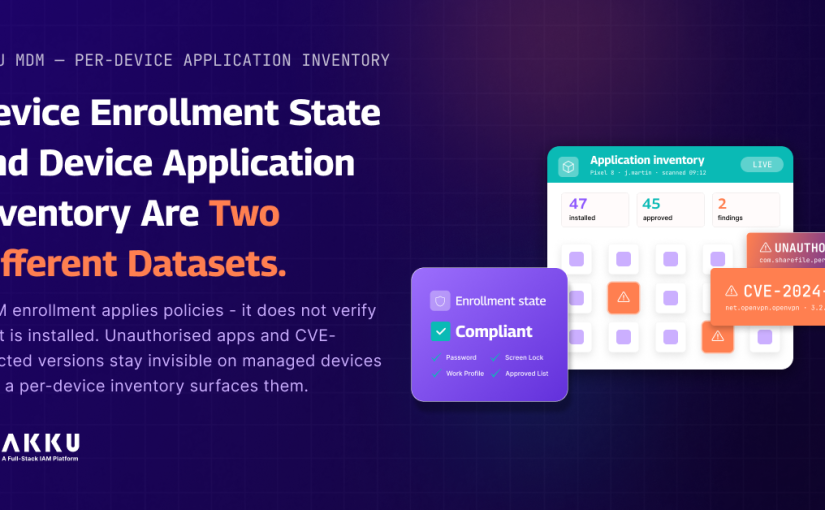
Device Enrollment State and Device Application Inventory Are Two Different Datasets.

When did your MDM platform last produce a complete list of every application installed on every enrolled device?

Not the applications you deployed through the MDM. Every application currently installed on each managed device, including what was installed after enrollment, outside the managed profile, or through channels your deployment policy did not account for.

For most organisations the honest answer is: it has not. MDM enrollment applies policies and configurations at the point of registration. It does not run a continuous inventory of what is installed on each device and surface that data in a queryable form. The policy says no unauthorised applications. Whether any unauthorised applications are actually present on enrolled devices is a question the platform is not answering. 

This gap has three specific consequences. An unauthorised application installed after enrollment is invisible until someone manually checks. A CVE-affected package version that was not updated when the disclosure was published sits on managed devices without the security team knowing which devices are affected. A shadow IT tool installed to handle a workflow that approved applications do not support creates a data handling exposure that nobody detected because nobody was looking.

This blog covers why MDM enrollment and MDM inventory are two different capabilities, what per-device application inventory changes at the operational level, and how package-level visibility connects to vulnerability management and compliance. 

Why MDM Enrollment Is Not the Same as MDM Inventory 

MDM enrollment is a point-in-time configuration event. When a device enrolls, the MDM platform pushes the defined policy set: password requirements, screen lock settings, work profile configuration, approved application list, network access rules. The device is now managed. The configuration baseline is applied.

What happens after enrollment is outside the scope of most MDM policy enforcement mechanisms unless the platform is specifically configured to continuously monitor device state. Applications installed from the personal profile on a work profile device, applications sideloaded outside the managed play store channel, and applications present on the device before enrollment on a BYOD deployment are not automatically surfaced in the MDM admin console as policy violations.

The result is a managed device estate where compliance is declared at enrollment and assumed continuously, rather than verified continuously. The policy exists. The enforcement evidence does not.

What the Gap Costs Operationally

Unauthorised Application Detection 

An employee installs a personal file-sharing application on their enrolled work profile device. The MDM policy prohibits unauthorised applications. The application is present. The MDM admin console shows the device as compliant because it has not run an inventory check against the approved application list since enrollment.

For ITeS and BPO organisations where employees access client systems from managed devices, an unauthorised application capable of handling clipboard data or capturing screen content creates a direct client data exposure risk. The contractual obligation to maintain secure managed devices is not satisfied by a policy that is never verified.

CVE-Affected Version Detection

A vulnerability disclosure identifies a specific version of a widely-used Android application as affected. The CVE is published with the affected package identifier and version range. Without per-device application inventory, the answer requires manually checking representative devices or waiting for the next managed application update cycle. With inventory data that includes package identifiers and version numbers for every installed application on every enrolled device, the query is immediate: return all devices where package identifier X is installed at version Y or below. 

Shadow IT Discovery

Shadow IT on managed devices is a data governance problem that most organisations discover reactively. An employee uses an unapproved note-taking application to capture meeting minutes containing client information. A developer uses a personal SSH client on their managed device. All of these create data handling exposures the organisation did not authorise and cannot manage without knowing the applications exist. Per-device inventory makes them visible.

What Per-Device Application Inventory Captures

Akku MDM’s per-device application inventory collects the installed application list from each enrolled Android device on a regular automated schedule. For each installed application, the inventory captures the application name, the package identifier in reverse domain notation, the installed version number, and the install date where available from the device.

The package identifier is the technically precise field that matters for security and compliance workflows. CVE databases reference affected software by package identifier. Vulnerability management tools query by package identifier. The inventory output uses the same identifier format, making cross-referencing against CVE feeds a direct comparison rather than a fuzzy name-matching exercise.

The inventory covers applications installed in the managed work profile and, where the device configuration and Android version permit, applications visible in the personal profile. The visibility scope in the personal profile is governed by Android’s enterprise privacy framework. Akku MDM operates within these framework boundaries.

How This Connects to App Whitelisting and Policy Enforcement

Akku MDM‘s app whitelisting and blacklisting capability is the enforcement layer. Per-device inventory is the visibility layer. Used together, the inventory identifies what is present and the policy defines what is permitted. The gap between the two is the enforcement finding.

For organisations managing compliance under DPDPA Rules 2025, the ability to demonstrate that enrolled devices carry only approved applications is part of the technical evidence that the device security standard is being maintained. A policy document is not sufficient. Inventory evidence that the policy is being met is what the compliance record requires.

The Three Questions Worth Asking About Your Current MDM Deployment

Navigate to your MDM admin console right now and open the record for any enrolled device that has been active for more than six months. Can you see a complete list of every application currently installed on that device? If the answer is no or partial, the inventory visibility gap is confirmed.

If a CVE disclosure was published today for a specific Android application package, how long would it take your security team to produce a list of every affected enrolled device? If the answer requires anything beyond a query against an inventory database, the data is not available in the form that vulnerability management requires.

For any enrolled device in your estate, can you confirm that the applications present today match the approved application list without physically inspecting the device or asking the user? If not, the compliance posture that Akku MDM is designed to maintain is being declared rather than demonstrated.

Explore Akku MDM Capabilities |  Talk to the Akku Team 

Questions IT Security and MDM Administrators Ask About Per-Device Application Inventory

Q: Does per-device inventory cover applications installed in the personal profile on a BYOD work profile device?

A: The scope depends on enrollment type, work profile configuration, and Android version. For fully managed corporate-owned devices, inventory covers all installed applications. For work profile deployments on personally-owned devices, managed work profile applications are always visible. Personal profile visibility depends on what Android’s enterprise privacy framework permits under the organisation’s MDM policy configuration. Akku MDM operates within these framework-defined boundaries.

Q: How does the package identifier field support vulnerability management workflows?

A: CVE databases reference affected software by package identifier, the reverse domain notation string that uniquely identifies an Android application. When a CVE disclosure identifies an affected package, the query against the Akku MDM inventory uses the package identifier directly: return all devices where this identifier is present at a version within the affected range. This produces a targeted list of affected devices without name-matching ambiguity. 

Q: How frequently does the inventory update?

A: The inventory updates on a regular automated schedule. The specific interval depends on MDM policy configuration and device connectivity state. Devices in active use with network connectivity update more frequently. The admin console displays the timestamp of the most recent inventory collection for each device.

Q: How does per-device inventory connect to DPDPA Rules 2025 device security requirements?

A: DPDPA requires data fiduciaries to implement technical measures to protect personal data, including ensuring access to personal data systems comes from devices meeting a defined security standard. Per-device application inventory provides the continuous verification evidence that policy enforcement alone cannot produce. The inventory record shows what was present on each device at a given point in time, which is the evidentiary basis for demonstrating that device security standards were being maintained continuously rather than declared at enrollment.

Q: What is the difference between app whitelisting and per-device inventory and why are both needed?

A: App whitelisting is a policy control defining which applications are permitted. Per-device inventory is a visibility control showing which applications are actually present. Policy without inventory means you have declared what should be present but have no mechanism to verify it. Inventory without policy means you can see what is present but have no standard to compare it against. The combination produces enforcement evidence rather than policy documentation.

Q: Can the inventory data be accessed programmatically for integration with vulnerability management or SIEM tools?

A: Yes. Inventory data is accessible through the Akku admin console and the Akku API. The API allows programmatic retrieval per device or across the full enrolled device estate. The package identifier field enables direct comparison between enrolled device inventory and CVE feed data without requiring custom field mapping or name-matching logic.

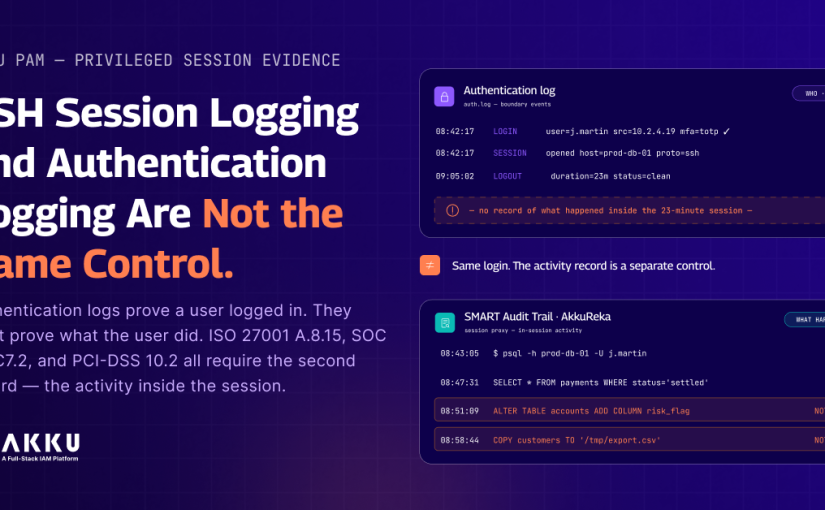
SSH Session Logging and Authentication Logging Are Not the Same Control.

A security incident investigation is three days in. A privileged user accessed a production database server on a Tuesday afternoon. Something changed on that server that caused a downstream service failure two days later.

The authentication log shows the login event. Username, timestamp, source IP, session duration. 23 minutes. The session ended cleanly. Nothing else is in the record.

The investigation needs to know what SQL queries were run. Which tables were accessed. Whether any schema changes were made. Whether any data was exported. None of that is in the log. The record proves the user was there. It cannot prove what they did while they were there.

The scope of the incident cannot be determined. The remediation cannot be confirmed as complete. The finding goes into the report as inconclusive.

This is not an unusual outcome. It is the default outcome in environments where privileged session governance means authentication logging without SMART Audit Trails. And it is increasingly a compliance gap as well as an operational one. 

What Authentication Logs Capture and What They Do Not

Authentication logs record the events at the boundary of a session: the login event with actor identity, timestamp, source IP, MFA method used, and authentication outcome. The session termination event with timestamp and duration. In some implementations, the target system and protocol.

What authentication logs do not capture: commands executed during an SSH session, SQL queries run during a database session, files accessed or modified, configuration changes made, RDP screen activity, Kubernetes kubectl commands. All of this happens inside the session, after the authentication event.

The distinction matters because authentication logs and SMART Audit Trails are used for different purposes. Authentication logs are useful for access certification, anomalous authentication pattern detection, and confirming that access occurred. They feed directly into the MFA failure and login metrics APIs discussed in previous blogs in this series.

SMART Audit Trails are useful for post-incident investigation, compliance evidence production, and insider threat detection. They answer a different question: not whether access occurred, but what happened during the access.

What ISO 27001:2022 and SOC 2 Actually Require

ISO 27001:2022 Annex A Control A.8.15

Control A.8.15 requires that event logs recording user activities, exceptions, faults, and information security events are produced, stored, protected, and analysed. The specific language is user activities. A login event is not a user activity. The commands the user ran during the session, the queries they executed, the files they accessed: those are user activities. A.8.15 requires the latter. An authentication log satisfies the access record requirement at the session boundary. It does not satisfy the activity record requirement for what occurred inside the session. SMART Audit Trails satisfy this second requirement. 

The 2022 revision of the standard also strengthened the protection requirement for event logs. Control A.8.15 specifies that log facilities and log information shall be protected against tampering and unauthorised access. For SMART Audit Trail recordings, this means they must be stored in a location the privileged user who ran the session cannot access or modify, regardless of their privilege level on the target system.

SOC 2 Trust Services Criteria CC7.2

SOC 2 CC7.2 requires that the organisation monitors system components and the operation of those controls for anomalous behaviour. Monitoring for anomalous behaviour in a privileged session requires SMART Audit Trail recordings. A login timestamp does not tell you whether the session contained anomalous commands.

The evidence standard for CC7.2 in a SOC 2 audit increasingly includes demonstrating that session-level monitoring is in place for privileged access, not just that authentication events are logged.

PCI-DSS Requirement 10

PCI-DSS Requirement 10.2 requires implementing audit logs to reconstruct activities for all individual user access to cardholder data and all actions taken by any individual with root or administrative privileges. For database sessions on systems containing cardholder data, this explicitly requires query-level logging, not authentication-level logging.

How AkkuReka Implements SMART Audit Trail Recording

AkkuReka is the session proxy component within Akku PAM. All privileged sessions are routed through AkkuReka rather than connecting directly to the target system. This proxy position means AkkuReka operates at the protocol layer between the authenticated user and the target, which is where the SMART Audit Trail data is generated.

SSH Sessions

For SSH sessions, AkkuReka captures a complete keystroke log per command, timestamped at the protocol level. Every command typed, every output returned, every file path referenced. The recording is structured per command as a discrete event with its own timestamp, making it searchable by command string rather than requiring review of a continuous recording.

Database Sessions

For MySQL and PostgreSQL sessions, AkkuReka captures both a screen recording and a structured SQL query log as part of the SMART Audit Trail. Each query is stored as a discrete record with execution timestamp, query text, and result metadata.

For financial services organisations where PCI-DSS, RBI, and SEBI compliance requires evidence of database access at the query level, this is the specific evidence type those frameworks are asking for. The authentication log confirms who logged in. The SQL query log confirms what they did once connected.

RDP and Kubernetes Sessions

For RDP sessions, AkkuReka captures full screen recordings at a configurable frame rate. For Kubernetes cluster access via kubectl, AkkuReka captures both a session event recording and a command log for kubectl operations. Kubernetes access is one of the most commonly excluded infrastructure categories from PAM deployments. The kubectl command log closes the same governance gap for container orchestration that SSH keystroke logging closes for Linux servers.

The Outbound Worker Architecture

AkkuReka uses an outbound worker model. A lightweight worker process is deployed in the same network segment as the target systems. The worker initiates an outbound TLS 1.3 connection to the Akku cloud platform. No inbound ports are required on target systems or firewalls. No agent installation. No SSH configuration changes. Target systems require no modification.

For ITeS and BPO organisations where target systems include client-managed infrastructure that cannot be modified, and for manufacturing organisations with OT-adjacent infrastructure where agent installation is operationally constrained, the agentless outbound worker model means session recording coverage can extend to systems that would be excluded from an agent-based architecture. 

Tamper Evidence and Storage 

SMART Audit Trail recordings are stored encrypted using AES-256-GCM in Akku’s audit storage layer. The storage is append-only. Recordings cannot be modified or deleted after they are written. The privileged user who ran the session has no access to the recording layer regardless of their privilege level on the target system. Even a user with root access on a Linux server cannot modify their recording because it is written to Akku’s audit storage at the proxy layer, outside the scope of any privilege the user holds on the target.

What to Check in Your Current Privileged Access Environment

For each category of privileged session in your environment, answer this question: if a privileged user ran a command during a session last Tuesday that caused a problem, how many minutes would it take your security team to identify the specific command, the specific session, and confirm attribution to a specific individual?

If the answer requires accessing logs on the target system itself, and the user who ran the session had the ability to modify those logs, the evidence integrity is compromised before the investigation starts.

For Linux servers, check whether SSH sessions are being captured in SMART Audit Trails beyond the standard auth.log authentication events. For database servers, check whether query-level logging is enabled and whether those logs are stored in a tamper-evident location outside the database server itself.

See AkkuReka Session Proxy Architecture  |  Explore Akku PAM  |  Talk to the Akku Team 

Questions Security and Compliance Teams Ask About Privileged Session Logging

Q: What is the technical difference between an authentication log and a SMART Audit Trail?

A: An authentication log records events at the session boundary: the login event with actor identity, timestamp, source IP, MFA method, and authentication outcome, and the session termination event with timestamp and duration. It records that access occurred. A SMART Audit Trail records what happened during the session: every command executed, every query run, every file accessed, every configuration change made. ISO 27001 A.8.15 requires both: the authentication record for access accountability and the activity record for user activity logging. Most privileged access environments have built the first and not the second.

Q: What is the storage format for AkkuReka SMART Audit Trail recordings?

A: SSH keystroke logs are stored as structured text with per-command timestamps, searchable by command string across all sessions in a time period. RDP recordings are stored as compressed video at the configured frame rate. Database session recordings include both a screen capture and a structured SQL query log where each query is a discrete record with execution timestamp, query text, and result metadata. All recordings are encrypted at rest with AES-256-GCM and accessible through the Akku admin console or API under RBAC-controlled access.

Q: Does AkkuReka require any agent installation or configuration changes on target systems?

A: No. AkkuReka uses an outbound worker model. The worker process is deployed on a separate host in the same network segment as the target systems. Target systems require no modification, no agent installation, and no configuration changes. The only requirement is that the AkkuReka worker has network access to target systems on their native protocol ports and outbound HTTPS on port 443 to the Akku cloud.

Q: How does AkkuReka protect SMART Audit Trail recordings from tampering by the privileged user?

A: AkkuReka records sessions at the proxy layer, outside the target system and outside the user’s access scope. A user with root access on a Linux server cannot modify their recording because it is not stored on the target. The storage is append-only and tamper-evident by design.

Q: How does SMART Audit Trail recording support compliance with PCI-DSS Requirement 10?

A: PCI-DSS Requirement 10.2 requires logging of all individual user access to cardholder data and all actions by individuals with root or administrative privileges. For database sessions in the cardholder data environment, this requires SQL query-level logging. AkkuReka’s structured SQL query log for MySQL and PostgreSQL sessions captures each query as a discrete record with execution timestamp and query text, directly satisfying the Requirement 10.2 evidence standard.

Q: What is the forensic search capability for SSH session recordings?

A: AkkuReka indexes SSH session recordings by command string and timestamp. An investigator querying for a specific command across all sessions in a defined time window receives the sessions where the command appeared, the exact timestamp, and a link to the playback position. An investigation that would require reviewing hours of recordings can be completed through a command string query in minutes.

Provisioned Access and Accessed Access Are Two Different Datasets.

A provisioning record captures a point-in-time entitlement decision: this user was granted access to this application on this date. It records that the door was opened. It contains no information about whether anyone has walked through it since.

An access usage record captures an event: this user authenticated and launched this application at this timestamp from this device. It records that the access was exercised. It is a different dataset from the provisioning record and in most IAM architectures, it does not exist. 

The absence of access usage data has three distinct consequences that are usually treated as separate problems but share the same root cause. First, dormant accounts with valid access entitlements accumulate as an unmonitored attack surface. Second, access reviews that run without usage data certify entitlements rather than evaluate continued need, which is not what ISO 27001 A.5.18, SOC 2 CC6.3, or DPDPA Rules 2025 require from a periodic access review. Third, SaaS licences assigned to users who have not launched the application in months represent recoverable budget that the organisation has no mechanism to identify without usage data.

This blog covers the technical distinction between the two datasets, what each consequence looks like operationally, and what application launch monitoring at the SSO layer produces as a usage record without requiring per-application integrations.

Why Provisioning Records Are Not Usage Records

Provisioning is architecturally event-driven: it triggers on access requests and access removals. Between those two events, the provisioning platform has no visibility into what happens with the entitlement. Whether the user launches the application daily or not at all, the provisioning record is identical. The record reflects the entitlement state, not the usage state. 

Application usage data, where it exists, lives in the application itself. Applications that generate access logs produce records of who authenticated and when. Those records live in the application’s own logging infrastructure. Pulling them into a coherent cross-application usage view requires native API integrations with each application, a CASB layer that monitors application traffic, or manual extraction on a schedule. None of these is operationally straightforward at scale across 40 to 60 SaaS applications. 

The result is that most organisations have precise provisioning records and no structured usage data. The two datasets that together constitute a complete picture of access governance exist independently, and most organisations only have one of them.

What the Absence of Usage Data Costs

Dormant Accounts as an Unmonitored Attack Surface

An account that has not been used in 90 days is not actively monitored by the user who owns it. Password change notifications go unread. Anomalous MFA prompts go unreported. If the account’s credentials are compromised, the compromise may not surface for weeks because the legitimate user has no reason to notice anything unusual about an account they are not using.

NIST SP 800-53 Control AC-2 recommends disabling inactive accounts after a defined period. ISO 27001:2022 Annex A Control A.5.16 requires that identity management include a mechanism for reviewing and disabling inactive identities. Most organisations have a policy that specifies an inactivity threshold. Very few have a technical mechanism that enforces it, because they do not have the usage data needed to identify which accounts are inactive.

Access Reviews Without a Meaningful Baseline

Access reviews under ISO 27001 A.5.18 and SOC 2 CC6.3 are supposed to evaluate whether access is still appropriate. Without usage data, the reviewer can confirm that the entitlement exists and that the user’s current role appears to justify it. They cannot evaluate whether the access has been exercised in the review period, whether the usage pattern is consistent with the stated business need, or whether the access should continue to exist given that nobody has used it in six months.

Under DPDPA Rules 2025, access to personal data should be granted on a need-to-know basis and reviewed periodically. A review that certifies access without any data on whether the access has been exercised is not a meaningful review of whether the need-to-know condition is still met. For financial services organisations and healthcare organisations where access reviews are part of RBI, SEBI, and HIPAA compliance obligations, a review based on usage data is qualitatively and evidentially different from a review based on entitlement records alone.

Recoverable SaaS Licence Spend

SaaS licences are priced per seat. A seat occupied by a user who has not launched the application in six months is a seat being paid for without return. Industry data from SaaS management platforms consistently indicates that between 20 and 30 percent of provisioned SaaS seats are unused in a typical month. For a mid-market organisation with 500 users and 50 SaaS applications, that percentage represents a significant monthly spend on licences that could be reclaimed and reallocated or cancelled. Identifying and reclaiming those seats requires knowing which users have not launched which applications in a defined period. That requires usage data. 

What Application Launch Monitoring Produces

Application launch monitoring captures the event that occurs when a user authenticates through the IAM platform and is directed to a specific application. It operates at the SSO layer, not at the application layer. Any application that uses SSO-based authentication through Akku produces a launch event at the identity platform regardless of whether the application has its own session logging capability. No per-application integration is required.

Each launch event captures the user identifier, the application accessed, the timestamp, the device, and the geo-location of the authentication. This data is stored per user per application, producing a usage record that sits alongside the provisioning record in the identity platform.

Last-Used Date Per User Per Application

The immediately actionable output is a last-used date for each user-application combination. An access review showing a user has not launched an application in 120 days has a different conversation than one showing daily usage. The reviewer makes a decision based on actual usage behaviour rather than on whether the user’s role still appears to justify the access in the abstract.

For automated lifecycle management, last-used date enables a technical policy: accounts that have not accessed an application within a defined period are flagged for review or automatically suspended based on the risk profile of the application. This is the technical enforcement of what ISO 27001 A.5.16 and most inactivity policies describe but rarely implement.

Anomaly Detection From Usage Baseline 

Application launch data over time produces a usage baseline per user per application. A user who normally launches the CRM five times daily but whose launch events stop appearing for two weeks has experienced something: a missed offboarding, extended leave, or an account compromise that locked the legitimate user out. A user who normally accesses a specific application once a week but suddenly launches it dozens of times in a single session is also anomalous. Both signals are only available if launch data is being collected.

Licence Reclamation With Documented Evidence

Usage data enables licence reclamation with evidence rather than estimation. The IT team produces a report showing per application: provisioned users, users who launched at least once in the last 30 days, and users who have not launched in 90 days. That report is the basis for a licence reclamation conversation with the application vendor. Removing dormant seats from a SaaS licence is a straightforward conversation when the usage data supports it.

How This Connects to Automated User Lifecycle Management

Application launch data is most operationally powerful when connected to the automated user lifecycle management layer in Akku rather than existing as a standalone reporting view. When the last-used date for a user-application combination crosses a defined threshold, the lifecycle management layer triggers a review workflow automatically: the user’s manager is notified, confirmation of continued need is requested, and access is removed if no confirmation arrives within the defined period.

This closes the loop between usage visibility and access governance without requiring a manual process for each dormant account. The review is triggered by the data. The outcome is recorded in the provisioning system. The audit trail shows that dormant access was identified, reviewed, and either confirmed or removed, which is the evidence that a meaningful periodic access review under ISO 27001 A.5.18 and DPDPA is supposed to produce.

For ITeS and BPO organisations where employees frequently change project assignments and client system access needs corresponding adjustment, application launch data makes the access actually being used visible in a way that a provisioning record cannot. Access to a client system that has not been launched since a project ended three months ago is a deprovisioning candidate that the standard offboarding process may have missed. 

Before You Move On

Pick three applications in your environment that hold sensitive data. For each one, pull the list of provisioned users from your IAM platform. Then answer: of those users, how many have not accessed the application in the last 90 days?

If the IAM platform cannot answer that question from its own data, the usage visibility gap is confirmed. The provisioning record exists. The usage record does not. The security implication is a list of dormant accounts passing access reviews without any evidence of whether the access is still exercised. The compliance implication is that those reviews, under DPDPA and ISO 27001, are based on entitlement data rather than access behaviour. The cost implication is a straightforward calculation: dormant licensed seats multiplied by the per-seat monthly cost. 

Explore Akku IAM and Lifecycle Management  |  See Akku IGA and Access Reviews  |  Talk to the Akku Team

Questions IT and Compliance Teams Ask About Access Usage Visibility

Q: What is the technical difference between a provisioning record and an application launch record? 

A: A provisioning record captures the entitlement lifecycle: when access was granted, by whom, under what approval, and when it was removed. It records a decision about access. An application launch record captures a usage event: a specific user authenticated and was directed to a specific application at a specific timestamp. The two records describe different things. A provisioning record answers whether a user has access. An application launch record answers whether a user has used their access. Both are required for complete access governance. Most IAM platforms maintain only the provisioning record.

Q: How does application launch monitoring differ from application-level session logging? 

A: Application-level session logging is performed by the application itself and requires either native logging capability in the application or a CASB layer intercepting traffic. Application launch monitoring is performed at the SSO layer: when the user’s authenticated session is redirected from the identity platform to the application, the launch event is captured. It requires no integration with each individual application. Any application using SSO-based authentication through Akku produces a launch event at the identity platform regardless of the application’s own logging capability.

Q: How does DPDPA treat dormant access to personal data systems?

A: DPDPA requires that access to personal data is granted on a need-to-know basis and reviewed periodically. An account that has not accessed a personal data system in several months raises a question about whether the need-to-know condition is still met. A periodic access review certifying access without usage data cannot meaningfully evaluate this. The DPDPA’s access accountability requirements imply that the organisation can demonstrate not just that access exists and was approved, but that access is actively justified by current need. Application launch data provides the evidence needed to distinguish active access from dormant access. 

Q: What is a practical inactivity threshold for triggering an access review?

A: The appropriate threshold depends on the application’s risk profile. For high-sensitivity applications containing personal data, financial records, or privileged system access, 30 days is appropriate. For standard productivity applications, 60 to 90 days is common. The threshold should be defined in the access control policy rather than set arbitrarily, so the automated review trigger is aligned with the policy’s stated inactivity standard. ISO 27001 A.5.16 does not specify a number but requires that inactive identities are identified and addressed within a defined timeframe.

Q: How does usage data improve the quality of access reviews under SOC 2 CC6.3?

A: SOC 2 CC6.3 requires periodic review of whether existing access is still appropriate. With only entitlement data, the reviewer confirms the access exists, and the role appears to justify it. With usage data, the reviewer can evaluate whether the access has been exercised in the review period and whether the usage pattern is consistent with the stated business need. A reviewer who sees that a user has not launched an application in 180 days makes a substantively different decision than one who sees only that the entitlement exists. The audit evidence produced by a usage-informed review is qualitatively stronger under both SOC 2 and ISO 27001.

Q: How does Akku connect application launch data to the provisioning and deprovisioning lifecycle?

A: In Akku, application launch events are captured at the SSO layer when users access applications through Akku-managed SSO. This data feeds into the access governance layer alongside provisioning records, producing a combined view of who has access and who is using it. Inactivity thresholds can be configured as policy rules that trigger automated review workflows when a user-application combination has not produced a launch event within the defined period. The full chain from provisioning through usage monitoring through periodic review to deprovisioning is traceable in a single audit trail.

Authentication Visibility Stops Where Your Monitoring Stack Ends.

If your SSO platform had a service disruption at 2am tonight, how would your team find out about it?

For most IT operations and security teams, the honest answer is: when the support tickets start arriving in the morning. Someone arrives at work, tries to log in, fails, and raises a ticket. By the time the third ticket arrives, the pattern is clear. By the time the root cause is identified, the disruption has been running for several hours.

This is not a process failure. It is an instrumentation gap. The authentication health signal that would have indicated the disruption at 2am was present in the IAM platform’s event stream the entire time. The success rate dropped. The failure rate climbed. The volume pattern shifted. All of it was in the data. None of it was connected to a monitoring layer that could evaluate it against a threshold and generate an alert before the first user noticed anything. 

The same gap applies to security incidents. A credential stuffing attack that ramps up at 3am and stops before dawn leaves its pattern in the authentication event stream. A SAML assertion configuration that broke during a maintenance window produces a consistent failure rate from the moment the change took effect. A compromised account used at unusual hours generates authentication volume that does not match the user’s baseline pattern. All detectable. All invisible if the authentication layer has no monitoring coverage.

This blog covers the architectural difference between a log interface and an authentication telemetry API, what the Login Metrics API with 24-hour trend data exposes, the specific detection scenarios it enables, and how it connects to the event-level signal data from the MFA Failures and Lockout API covered in the previous blog.

The Architectural Difference Between a Log Interface and a Telemetry API

Every IAM platform produces authentication event data. The question is what form it takes and what it is designed for.

A log interface is designed for a human analyst investigating a known problem. They navigate to the log viewer, apply filters, select a time range, and read the results. It answers questions when asked. It does not surface anomalies unprompted. If an analyst does not know a problem exists, the log interface provides no signal. The detection latency of a log interface is the time between an anomaly occurring and the next time a human happens to look at the right screen.

A telemetry API is designed for a monitoring system that evaluates data continuously against defined thresholds. It delivers pre-aggregated metrics in a structured format that a dashboard or alerting rule can consume without a human in the loop. The detection latency of a telemetry API connected to a monitoring layer is the time between an anomaly occurring and the alerting threshold being breached, which is minutes rather than hours.

Most IAM platforms provide the first. Akku’s Login Metrics API provides the second.

What the Login Metrics API Provides

Total Login Count Over Configurable Time Windows

Login volume is the baseline for anomaly detection. Normal Monday morning volume for a given environment might be 2,400 authentication events in the first hour. A Monday morning producing 400 events in that window is an anomaly: a service disruption, a network issue, or a configuration problem blocking users from reaching the authentication layer. Volume anomaly detection requires a baseline. The configurable time windows in the API allow the monitoring layer to compare current volume against historical baselines for the same time window and day of week automatically.

Login Success Rate as a Percentage

Success rate is the most sensitive indicator of authentication health. In a healthy environment with MFA enforcement, success rate sits within a consistent range, typically between 93 and 97 percent accounting for routine MFA failures. A drop to 78 percent is a signal regardless of the cause: broken SAML assertion, misconfigured service account credentials, active attack, or integration failure. The monitoring layer does not need to identify the cause to fire the alert. It needs to know the rate has moved outside the normal range.

Login Failure Rate by Authentication Stage 

Failure rate broken down by authentication stage provides diagnostic context. A spike in primary credential failures indicates something different from a spike in MFA failures. Primary credential failures at elevated rates suggest a password sync problem, stale credentials in an integration, or a credential stuffing attempt using out-of-date credentials that fail before reaching the MFA step. MFA failure spikes indicate the attack patterns described in Blog 2 of this series. Stage-level breakdown narrows the investigation before anyone opens a log viewer. 

24-Hour Sparkline Trend Data

The 24-hour sparkline provides temporal context. A success rate of 89 percent is alarming if yesterday’s baseline was 96 percent. It is expected if the last 24 hours shows a gradual drift from 92 percent correlating with a known migration. The sparkline is an ordered array of hourly data points covering the previous 24 hours, structured for direct embedding in Grafana, Datadog, and custom JSON-sourced dashboards. The time series format is compatible with Grafana’s native time series panel without transformation. A visual trend line rather than a single number makes the distinction between a sudden anomaly and gradual drift immediately obvious.

Detection Scenarios This Data Enables

SAML and OIDC Integration Failure

A SAML assertion configuration is modified during a maintenance window. The change is syntactically valid but semantically incorrect: the audience restriction is set to the wrong service provider identifier. Every authentication attempt against that integration fails from the moment the change takes effect. Without authentication telemetry, the failure accumulates invisibly until users arrive in the morning and report problems. With a success rate threshold alert connected to the Login Metrics API, the monitoring layer fires within minutes of the configuration change. The investigation identifies the maintenance window as the cause before the first user has noticed anything.

Gradual Certificate Expiry

A certificate used in an OIDC integration approach’s expiry. The relying party begins intermittently rejecting authentication attempts as the validity window narrows. The success rate drifts downward over several days from 96 percent to 88 percent. A sharp drop triggers a threshold alert immediately. A gradual drift requires trend analysis. A monitoring rule comparing the current success rate against the 7-day rolling average fires when the deviation exceeds a defined percentage, detecting the drift long before the certificate expires entirely and authentication fails completely.

Off-Hours Authentication Volume Anomaly

A compromised account is used by an attacker outside the legitimate user’s normal working hours. Authentication volume for that identifier between midnight and 4 am significantly exceeds the user’s normal overnight baseline. Per-identifier volume monitoring built on the Login Metrics API detects this. A rule flagging identifiers with overnight volume exceeding their rolling baseline by a defined percentage surfaces the anomaly before the account owner’s working day begins.

How This Connects to the MFA Failures and Lockout API

The Login Metrics API provides aggregate health data for operational monitoring and threshold alerting. The MFA Failures and Lockout API covered in Blog 2 provides individual event data for SIEM detection rules and investigation. The two APIs address different points in the detection and response chain. When the metrics layer fires a success rate alert, the event layer provides the data to investigate the cause: which specific identifiers are failing, which methods are failing, and whether the pattern matches an attack or a configuration problem. Both are needed for complete authentication visibility.

For ITeS and BPO organisations where authentication availability directly affects client SLA obligations, the combination of metrics-layer alerting and event-layer investigation changes means time to detect and mean time to resolve for authentication incidents. For financial services organisations where RBI’s Cybersecurity Framework requires near-real-time monitoring of authentication anomalies, the Login Metrics API with sub-minute polling latency satisfies the monitoring requirement at the data layer.

What to Check About Your Current Authentication Visibility

Ask whoever is on call tonight this question: if the login success rate across your SSO dropped 20 per cent right now, how long would it take them to find out, assuming no users report anything?

If the answer is measured in hours, authentication health is not part of your current monitoring architecture. The IAM platform is producing the data. Nothing is consuming it for alerting purposes.

The follow-up question: What is the current source of truth for authentication health? If the answer is the IAM platform’s internal admin console rather than a connected monitoring tool with configurable alerting, the detection latency for authentication anomalies is the time between the anomaly occurring and the next time someone manually opens that console. That gap is where incidents live between 2 am and 9 am.

See Akku IAM Authentication Architecture  |  Explore Akku MFA Capabilities  |  Talk to the Akku Team

Questions IT Operations and Security Teams Ask About Authentication Telemetry

Q: What is the data format and query interface for the Login Metrics API? 

A: The Login Metrics API returns structured JSON. Each response includes the time window covered, total login count, success count, failure count, success rate as a percentage, failure rate as a percentage, and the 24-hour sparkline as an ordered array of objects where each object contains a timestamp and a value. The API supports configurable time windows for aggregate metrics. The sparkline provides hourly data points over the previous 24 hours by default, with the option to request higher granularity at shorter intervals. The format is designed for embedding in dashboard tools that support JSON data sources, including Grafana and Datadog.

Q: How does this API differ from the logs already available in the Akku admin console?

A: The admin console provides access to the full audit log through a user interface designed for manual review and investigation. The Login Metrics API provides pre-aggregated metrics in a format designed for programmatic consumption by monitoring tools and alerting systems. The distinction is between a log interface requiring a human to navigate and interpret the data, and a metrics API delivering structured numerical data ready for automated threshold evaluation. The underlying authentication event data is the same source. The format and delivery mechanism are optimised for different consumers.

Q: Can this data be integrated with Grafana, Datadog, or similar observability platforms?

A: Yes. The structured JSON output is compatible with any observability platform supporting HTTP-based data sources, including Grafana, Datadog, and New Relic. For Grafana, the API can be configured as an Infinity data source. The sparkline data array is directly compatible with Grafana’s time series panel format without a data transformation step. For teams centralising infrastructure and application metrics in an observability platform, the Login Metrics API closes the gap where authentication health was previously absent from the unified operational dashboard.

Q: How does the 24-hour trend data help distinguish attacks from configuration problems?

A: Attacks and configuration problems produce different trend shapes. A sudden step-change drop at a specific timestamp is characteristic of a configuration event. A gradual drift downward over hours or days is more consistent with an expiring certificate or degrading integration. A spike in failure rate affecting only certain MFA methods while others remain normal points to an MFA delivery issue rather than a broad authentication failure. The 24-hour sparkline provides the temporal context needed to distinguish these patterns, which determines whether the appropriate response is a configuration rollback, a certificate renewal, or a security incident response. 

Q: How does authentication health monitoring connect to privileged session monitoring in Akku PAM? 

A: Authentication health monitoring through the Login Metrics API covers the authentication layer: who is attempting to authenticate, at what volume, and with what success rate. Privileged session monitoring through AkkuReka covers what authenticated privileged users do inside their sessions: commands executed, files accessed, and configuration changes made. The two monitoring layers address different risk surfaces. Authentication monitoring detects anomalies at the perimeter of the identity layer. Session monitoring detects anomalies inside the sessions of users who have already authenticated. For a comprehensive identity security monitoring posture, both layers are needed. 

Q: How does login volume monitoring support capacity planning beyond security monitoring? 

A: Authentication volume data over configurable time windows provides the baseline for IAM infrastructure capacity planning. Peak authentication times, day-of-week patterns, and growth trends are all derivable from the Login Metrics API output. For organisations planning IAM platform capacity for workforce growth, mergers, or seasonal peaks, the historical volume data provides the input for capacity modelling. The security monitoring use case and the capacity planning use case share the same API output, making the integration investment serve both purposes.

IAM Authentication Events Are Absent From Most SIEM Detection Pipelines.

The IAM layer generates the earliest detectable signal of a credential attack. Before any account is compromised, before any privileged session is opened, before any data is accessed, the attack produces a pattern in the authentication event stream: MFA failure spikes across multiple distinct account identifiers, account lockout clusters on targeted identifiers, or anomalous recovery attempt volume against accounts the attacker does not own.

That signal is present in the IAM platform’s event log. In most organisations, it does not reach the SIEM. Not because the SIEM cannot evaluate it, but because the IAM authentication event stream is not connected to the detection pipeline in a form that detection rules can consume in real time.

The architectural reason is specific. SIEM deployments are built around log sources with standardised connectors and documented formats: Windows Event Logs, firewall syslog, endpoint detection telemetry, and cloud provider audit logs. IAM authentication events are less standardised across vendors. Getting them into a SIEM has historically required custom log parsing, manual export pipelines with significant latency, or professional services integrations that are expensive to build and maintain. None of these produces a real-time structured event stream. The detection gap is an integration architecture problem, not a SIEM capability problem.

This blog covers what the credential attack signal looks like in the IAM authentication event stream at the technical level, why the three conventional integration approaches all fail to close the detection gap, and what a structured API feed from the IAM layer changes for detection rule design and SIEM integration.

Why Conventional IAM-to-SIEM Integration Approaches Fail

Custom Log Parsing

Raw log parsing requires building regex patterns against the IAM platform’s native log format. The patterns work until the log format changes, which happens with platform version updates. The maintenance overhead is ongoing. More critically, the output of raw log parsing is rarely clean enough for threshold-based detection rules: field extraction inconsistencies produce false positives at rates that make the rules operationally useless. 

Manual Export Pipelines

Scheduled batch exports run on a defined interval. Hourly is common. The detection latency introduced by a one-hour export interval means that a credential stuffing attack that runs for 40 minutes and stops has exited the active attack window before the data reaches the detection layer. The SIEM fires on historical data. The attacker is gone.

Professional Services Integrations

Custom integrations built by professional services teams are accurate but brittle. When the IAM platform updates or the SIEM changes versions, the integration requires rework. Most organisations that have gone this route maintain a connector that is perpetually one version behind. The integration exists on paper. The event data it delivers is incomplete or delayed in practice.

What Credential Attacks Look Like in the IAM Authentication Event Stream

Credential Stuffing: MFA Failure Rate Across Distinct Account Identifiers

Credential stuffing uses username and password combinations from breach databases. The attacker does not know which credentials are still valid, so they attempt to authenticate across a large number of distinct account identifiers. Against an organisation with MFA enforcement, valid primary credentials are blocked at the MFA challenge. The result in the authentication event stream is a spike in MFA failures across many distinct actor identifiers within a short time window.

Each individual failure is routine. The pattern across dozens of distinct identifiers within minutes is not. A detection rule evaluating MFA failure rate across distinct account identifiers within a rolling time window fires on this pattern before any account is compromised. The rule needs the event stream. 

Brute Force: Lockout Clusters on Specific Identifiers 

Brute force attacks target specific account identifiers with repeated authentication attempts. Most lockout policies trigger between 5 and 10 failed attempts. The attack produces a sequence of authentication failures on a single identifier ending in a lockout event. A single lockout is routine. Multiple lockouts on distinct identifiers within a short window, or repeated lockouts on the same identifier following manual unlocks, is a brute force signal. Detection rules built on lockout event data with time-window clustering logic identify this pattern. The data needs to be in the SIEM.

Account Recovery Exploitation: Anomalous Recovery Attempt Volume

Social engineering attacks targeting recovery flows initiate recovery requests across a set of target accounts. The volume of recovery attempts across distinct identifiers in a short window is anomalous against any reasonable baseline. This signal does not appear in network logs, endpoint telemetry, or firewall data. It only exists in the IAM authentication event stream. Most SIEM deployments have no recovery attempt data from the IAM layer at all.

What the Akku MFA Failures and Lockout API Exposes

Akku’s Locked Accounts, MFA Failures and Recovery Attempts API provides a structured JSON event stream covering all three signal types. Each MFA failure event includes event_type, actor_id, timestamp (ISO 8601 with millisecond precision), mfa_method (TOTP, push, hardware_token, or FIDO2), failure_reason (wrong_code, expired_code, or method_unavailable), outcome, source_ip, geo_location, and risk_context from the adaptive MFA evaluation. Each lockout event includes actor_id, timestamp, failed attempt count, and source_ip. Each recovery attempt event includes actor_id, timestamp, recovery method, and outcome.

The API supports real-time streaming retrieval and batch polling with intervals as short as one minute. For SIEM deployments consuming streaming event data, events are available as they are written to the audit log. For polling integrations, one-minute intervals reduce detection latency to a fraction of what hourly batch exports produce.

The schema is consistent with Akku’s standard audit log field definitions, making it compatible with SIEM parsing rules already built for the Akku audit log format without requiring separate field extraction logic.

What Detection Rules This Data Enables

Credential Stuffing Detection in Splunk SPL and Microsoft Sentinel KQL

In Splunk SPL, a credential stuffing detection rule on this event stream is a standard stats count(distinct actor_id) by time_bucket query with a where clause on the count exceeding a defined threshold. In Microsoft Sentinel KQL, the equivalent is a summarize dcount(actor_id) by bin(TimeGenerated, 10m) query with a where clause on the distinct count. Both are native query constructs in their respective platforms. No custom detection logic is required. The threshold is calibrated against the normal baseline MFA failure rate in the specific environment.

Adaptive MFA Risk Context as a Detection Signal

Akku’s adaptive MFA evaluates contextual risk signals before triggering the MFA challenge: geo-location relative to the user’s baseline, IP reputation, time-of-day, and device familiarity. The outcome of this evaluation is included in the risk_context field of each event. Detection rules can weight MFA failures differently based on this context. A failure from a known device at a normal time contributes a lower risk signal than a failure from an unrecognised device at 3am from a high-risk IP. This reduces false positives from legitimate users who occasionally fail the MFA challenge while maintaining sensitivity to attack patterns.

How This Connects to the Login Metrics API

The MFA Failures and Lockout API provides event-level signal data for detection rules. Akku’s Login Metrics API provides aggregate authentication health metrics for operational monitoring: total login counts, success rates, failure rates, and 24-hour trend data. Used together, the event-level API feeds SIEM detection rules and the metrics API feeds operational dashboards and threshold alerting. The two APIs address different points in the detection and response chain. Both are needed for complete authentication visibility.

What to Check About Your Current Detection Coverage

Query your SIEM for detection rules that reference your IAM platform as a data source. Count the rules that use MFA failure data as an input. Count the rules that use account lockout event data. Count the rules that reference recovery attempt activity.

If the answer to all three is zero, the detection stack has no coverage for credential-based attacks operating at the authentication layer. For financial services organisations under RBI’s near-real-time monitoring requirements, and for ITeS and BPO organisations where client data protection obligations require active authentication anomaly monitoring, the absence of IAM event data in the SIEM is a regulatory gap as well as an operational one.

See Akku IAM Authentication Architecture  |  Explore Akku MFA Capabilities  |  Talk to the Akku Team

Questions Security Operations Teams Ask About IAM and SIEM Integration

Q: What is the specific JSON schema for the MFA Failures and Lockout API output?

A: Each event object includes event_id (unique immutable identifier), event_type (mfa.failure, account.locked, or recovery.attempted), timestamp (ISO 8601 with millisecond precision), actor_id (Akku IAM user identifier), mfa_method (TOTP, push, hardware_token, or FIDO2 for MFA failure events), failure_reason (wrong_code, expired_code, or method_unavailable for MFA failure events), outcome (failure or blocked), source_ip, geo_location, and risk_context (adaptive MFA risk signals evaluated for the authentication attempt). The schema is consistent with Akku’s standard audit log field definitions, making it compatible with SIEM parsing rules already built for the Akku audit log format.

Q: Can these detection rules be built in Splunk SPL or Microsoft Sentinel KQL without custom development?

A: Yes. In Splunk SPL, credential stuffing detection is a standard stats count(distinct actor_id) by time_bucket query with a where clause on the count. In Microsoft Sentinel KQL, the equivalent is a summarize dcount(actor_id) by bin(TimeGenerated, 10m) query. Both are native constructs. The API output is structured to avoid requiring custom field extraction. Once the API feed is configured as a data source, detection rules can be built using the SIEM platform’s native query language.

Q: How does adaptive MFA reduce false positives in credential attack detection rules?

A: Akku’s adaptive MFA evaluates geo-location relative to the user’s baseline, IP reputation, time-of-day, and device familiarity before triggering the MFA challenge. The risk_context field in each event carries this evaluation. Detection rules can use this field to weight failures by context: a failure from a known device at a normal time is weighted lower than a failure from an unrecognised device at an unusual time from a high-risk IP. This reduces false positives from legitimate users who occasionally fail the MFA challenge while maintaining detection sensitivity for attack patterns.

Q: What is the latency between an authentication event occurring and it being available through the API?

A: Events are written to the Akku audit log in near-real time. The API reflects the current audit log state with low query latency. For streaming SIEM integrations, events are available as they are written. For polling integrations, intervals as short as one minute are supported. A credential stuffing attack running for 10 minutes produces event data available in the detection stack within minutes of the first failure, rather than at the next scheduled hourly batch export. 

Q: How does this integrate with SOAR platforms for automated response?

A: The structured JSON output is compatible with SOAR platform ingestion. A common automated response pattern: the SIEM detection rule fires on an MFA failure threshold breach, triggers a SOAR playbook, the playbook queries the API for additional context on flagged actor identifiers (source IPs, failure methods, geo-locations), and based on that context either automatically locks flagged accounts and notifies the security team or escalates to a human analyst. The API supports both real-time queries for individual actor identifiers and batch queries for multiple identifiers.

Q: How does the MFA Failures API differ from the login activity data in the Akku admin console?

A: The admin console provides access to the full audit log through a user interface designed for manual review. The MFA Failures and Lockout API provides a programmatic event stream designed for machine consumption: structured JSON with consistent field names, event-level granularity, and real-time or batch retrieval. The distinction is between a log interface requiring a human to navigate and interpret, and an event stream that detection rules evaluate automatically against thresholds. The underlying data is the same. The format and delivery mechanism are designed for different consumers.

Informal Access Provisioning Produces No Defensible Audit Evidence.

Defensible audit evidence for an access grant has a specific technical definition. It is not a confirmation that the access exists. It is not a record that the access was provisioned. It is a structured record of a formal authorization decision: the identity of the person who approved the access, their authority to approve it, the scope of access approved, the business justification, and the timestamp of the decision, all stored in a system that is queryable, tamper-evident, and independent of any individual’s inbox.

An email from a department head saying please give Rahul access to the finance system satisfies none of those requirements. It is a request. The IT manager acting on it is a provisioning action. Neither constitutes a formal authorization decision in the sense that ISO 27001:2022 Annex A Control A.5.18, SOC 2 CC6.1, or DPDPA Rules 2025 mean when they use that term.

The gap between what most organizations produce as access approval records and what those frameworks require is one of the most consistent findings in IT compliance audits. It persists not because IT teams are careless but because the tooling most organizations rely on was built to provision access efficiently. Recording the governance decision behind the provisioning action was never part of the design.

This blog covers exactly what defensible audit evidence for access governance requires technically, where informal approval processes fail against each framework standard, and what a structured approval workflow produces that an email thread cannot.

What Defensible Audit Evidence for Access Governance Actually Requires

ISO 27001:2022 Annex A Control A.5.18 requires that access rights are provisioned based on a formal authorization process, and that the process is documented. The documentation requirement is specific: it must be possible to demonstrate, for any access grant, that an authorization process was followed. That demonstration requires a record with identifiable fields, not a message that may or may not contain the relevant information depending on how it was written.

The specific fields that constitute a defensible access authorisation record are: the identity of the requester and their role, the identity of the approver and their authority to approve access of the type requested, the system and permission scope being approved, the business justification for the access, the timestamp of the approval decision, the duration of the access where time-limited, and a reference to the access control policy or role definition the approval was evaluated against.

SOC 2 CC6.1 requires that logical access controls restrict access to authorized individuals and that the authorization can be demonstrated. The evidence standard for CC6.1 is a queryable record showing that each access grant was authorized by a person with the defined authority to grant it. An email buried in a former employee’s archived mailbox does not constitute a queryable record in any operationally meaningful sense.

DPDPA Rules 2025 require that access to personal data is granted on a need-to-know basis. At the evidence level, this means the organization must demonstrate on demand that each access grant to a personal data system was based on a documented business need, approved by an appropriate authority, and reviewed since it was granted. A supervisory review under DPDPA does not arrive on a scheduled basis. It can arrive following an incident. The evidence of access governance needs to be retrievable immediately, not reconstructed from historical communications.

Where Informal Approval Processes Fail the Evidence Standard

The Record Is Tied to an Individual Inbox

An email approval lives in the approver’s inbox. When that person leaves the organization, the inbox is archived, restricted, or deleted depending on the organization’s data retention policy. Reconstructing an access decision made 18 months ago by a manager who left the organization 12 months ago requires locating the archived mailbox, obtaining access to it, identifying the correct thread, and confirming that the relevant approval is in the thread rather than in a separate conversation. This is an investigation, not a record retrieval.

A structured approval record stored in the identity governance platform is queryable by the compliance team regardless of whether the original approver is still with the organization. The record exists independently of any individual’s employment status.

The Record Has No Structured Schema

An email approval has no schema. Whether it contains the information an auditor needs depends entirely on how the email was written. A subject line reading access for new joiner and a body reading please sort this out contains no approver identity in a queryable field, no scope definition, no business justification, and no reference to an access control policy. It contains a request. That is not the same as an authorization record.

A structured approval record has defined fields. Every record for every access grant contains the same information in the same format, regardless of who wrote the request or how formally they phrased it. The schema enforces the evidence standard at the point of approval, not at the point of the audit.

The Approval Scope Is Undefined

Email-based approvals routinely approve access at an application level without defining the role, permission set, or data scope within the application. Approving access to Salesforce without specifying whether that means read-only access to one regional pipeline or administrative access to the full CRM is not a scoped authorization. It is a vague grant that cannot be meaningfully reviewed for continued appropriateness because the original scope was never defined.

Under SOC 2 CC6.3, access reviews are supposed to evaluate whether existing access is still appropriate. If the original approval did not define the scope, the reviewer has no baseline against which to evaluate appropriateness. They are certifying that the access exists and that the user’s role appears to justify something. They cannot evaluate whether the specific access granted was appropriate then or remains appropriate now.

What a Structured Approval Workflow Produces That Email Cannot

A Schema-Enforced Authorization Record 

A structured workflow captures the approval decision in a defined schema at the point the decision is made. The requester, approver, access scope, business justification, and timestamp are all mandatory fields. The record cannot be created without them. This means the evidence standard is enforced by the system rather than by the discipline of the person writing the email. 

A Queryable Audit Trail Independent of Personnel

The approval record lives in the identity governance platform, not in an inbox. It is queryable by system identifier, user identifier, approver identity, application, date range, and approval status. A compliance team preparing for an ISO 27001 audit can retrieve the complete approval history for any application in under a minute. The same query works whether the original approver is still with the organization or left three years ago.

An Access Review Baseline With Defined Scope

When an access review runs under ISO 27001 A.5.18 or SOC 2 CC6.3, the reviewer sees the original approval record alongside the current access state. They can evaluate whether the business justification still holds, whether the scope of access is still appropriate given the user’s current role, and whether the duration of the access was meant to be time-limited. This is a genuine review of continued appropriateness, not a certification that the access exists.

For financial services organizations under RBI’s Cyber Security Framework and SEBI CSCRF requirements, structured access approval records satisfy the audit trail requirement at the individual access grant level. For ITeS and BPO organizations subject to client compliance audits with short notice, retrievable approval records change the audit response time from days to minutes.

How This Connects to the Broader Identity Governance Architecture

Structured access approval workflows are one component of identity governance and administration that sits in front of the provisioning layer. The approval record triggers the provisioning action. The two records reference the same request identifier, so the full chain from approval to entitlement to periodic review to deprovisioning is traceable in a single audit trail.

For organizations using Akku IAM for provisioning, adding structured approval workflows closes the governance gap without replacing the provisioning architecture. The approval step sits in front of provisioning and produces the audit record that the provisioning action alone cannot.

Before You Move On

For any five access grants made in the last 12 months to a sensitive system, try to retrieve the authorization record from your current systems. Check whether the record contains the approver’s identity, the scope of access approved, the business justification, and the timestamp of the decision, all in a queryable format.

If any of those five records requires searching an inbox, asking the original approver, or acknowledging that the record may not exist in a structured form, the gap between your current process and what ISO 27001 A.5.18 and DPDPA require is confirmed.

Explore Akku IGA Capabilities  |  See Akku IAM Provisioning  |  Talk to the Akku Team 

Questions Compliance and IT Teams Ask About Access Approval Workflows

Q: What is the difference between an access request and an access approval under ISO 27001?

A: An access request is an expression of intent: someone wants access to a system. An access approval is a formal authorisation decision: a person with defined authority has reviewed the request against the access control policy and made a documented decision to approve it. ISO 27001:2022 Annex A Control A.5.18 requires that access rights are provisioned based on a formal authorisation process, and that the process is documented. An email request that an IT manager acted on is a fulfilled request. It is not a documented authorisation process unless the approval decision itself was recorded in a structured schema with the approver identity, scope, business justification, and timestamp.

Q: What does DPDPA Rules 2025 require specifically at the access approval evidence level?

A: DPDPA requires data fiduciaries to implement technical and organisational measures ensuring access to personal data is granted on a need-to-know basis. At the evidence level, the organisation must demonstrate on demand that each access grant to a personal data system was based on a documented business need approved by an appropriate authority. The DPDPA does not prescribe a specific tool. It sets an outcome: the access decision must be demonstrable. An email in an inbox that may or may not be searchable after the approver has left the organisation does not satisfy this standard in a regulatory review or supervisory investigation context.

Q: What should a structured access approval record contain to satisfy audit requirements across ISO 27001, SOC 2, and DPDPA simultaneously?

A: The record should contain the identity of the requester and their business role, the identity of the approver and their authority to approve access of the type requested, the system and permission scope being approved, the business justification for the access, the timestamp of the approval decision, the duration of the access where time-limited, and a reference to the access control policy or role definition the approval was evaluated against. This structure satisfies the documentation requirement of ISO 27001 A.5.18, the authorization evidence requirement of SOC 2 CC6.1, and the access accountability requirement of DPDPA. For multi-level approvals, each approval step should have its own record.

Q: How does a structured approval workflow connect to the access review process under SOC 2 CC6.3?

A: SOC 2 CC6.3 requires periodic review of whether existing access is still appropriate. For that review to be meaningful, the reviewer needs to know what was approved, at what scope, and for what business justification. A structured approval workflow provides this baseline automatically. The reviewer sees the original approval record alongside the current access state and can evaluate whether the justification still holds. Without this baseline, the reviewer can only certify that the access exists, not that it remains appropriate. The quality difference between the two types of review is the difference between a compliance exercise and a genuine governance evaluation.

Q: How do you transition from email-based approvals to a structured workflow without disrupting operations?

A: Three steps. First, define the approval workflow for each category of sensitive system: who has authority to approve access, what information must be captured, and what the response time expectation is. Second, configure the identity governance platform so that provisioning actions for those systems require a completed approval record rather than an informal message. Third, make the new process at least as fast as the informal one for routine requests. A well-configured approval workflow for a standard access request should complete in under an hour. The operational disruption is minimal if the workflow is designed around the actual approval behaviour rather than around a theoretical governance model.

Q: What is the regulatory risk of continuing with informal access approvals under DPDPA and ISO 27001? 

A: Under ISO 27001, informal access approvals are a control gap that affects certification. An auditor finding that access rights are provisioned without a documented authorization process is an A.5.18 nonconformity. Under DPDPA, the risk is potentially more significant because the data protection board has investigatory powers that are not confined to scheduled audits. An organization that cannot demonstrate structured access approval records for personal data systems is in a materially weaker position in any regulatory interaction, regardless of whether a breach has occurred. The absence of evidence is not evidence of absence in a regulatory investigation.