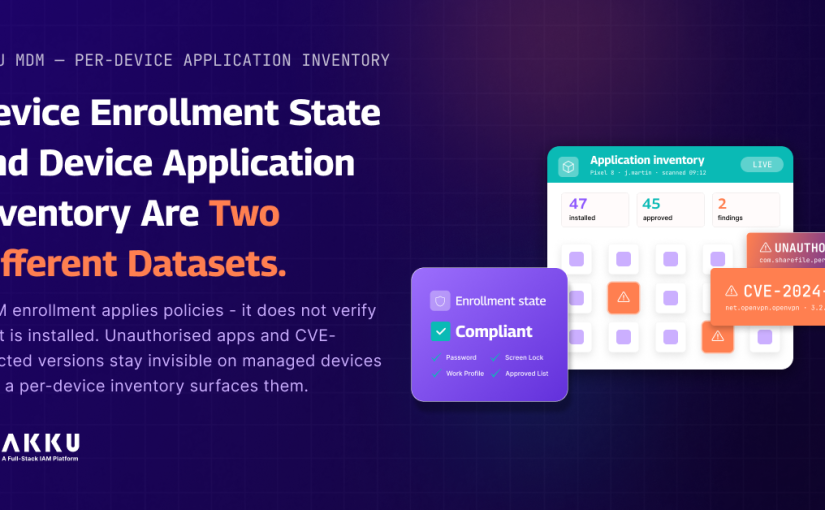
Device Enrollment State and Device Application Inventory Are Two Different Datasets.

When did your MDM platform last produce a complete list of every application installed on every enrolled device?

Not the applications you deployed through the MDM. Every application currently installed on each managed device, including what was installed after enrollment, outside the managed profile, or through channels your deployment policy did not account for.

For most organisations the honest answer is: it has not. MDM enrollment applies policies and configurations at the point of registration. It does not run a continuous inventory of what is installed on each device and surface that data in a queryable form. The policy says no unauthorised applications. Whether any unauthorised applications are actually present on enrolled devices is a question the platform is not answering. 

This gap has three specific consequences. An unauthorised application installed after enrollment is invisible until someone manually checks. A CVE-affected package version that was not updated when the disclosure was published sits on managed devices without the security team knowing which devices are affected. A shadow IT tool installed to handle a workflow that approved applications do not support creates a data handling exposure that nobody detected because nobody was looking.

This blog covers why MDM enrollment and MDM inventory are two different capabilities, what per-device application inventory changes at the operational level, and how package-level visibility connects to vulnerability management and compliance. 

Why MDM Enrollment Is Not the Same as MDM Inventory 

MDM enrollment is a point-in-time configuration event. When a device enrolls, the MDM platform pushes the defined policy set: password requirements, screen lock settings, work profile configuration, approved application list, network access rules. The device is now managed. The configuration baseline is applied.

What happens after enrollment is outside the scope of most MDM policy enforcement mechanisms unless the platform is specifically configured to continuously monitor device state. Applications installed from the personal profile on a work profile device, applications sideloaded outside the managed play store channel, and applications present on the device before enrollment on a BYOD deployment are not automatically surfaced in the MDM admin console as policy violations.

The result is a managed device estate where compliance is declared at enrollment and assumed continuously, rather than verified continuously. The policy exists. The enforcement evidence does not.

What the Gap Costs Operationally

Unauthorised Application Detection 

An employee installs a personal file-sharing application on their enrolled work profile device. The MDM policy prohibits unauthorised applications. The application is present. The MDM admin console shows the device as compliant because it has not run an inventory check against the approved application list since enrollment.

For ITeS and BPO organisations where employees access client systems from managed devices, an unauthorised application capable of handling clipboard data or capturing screen content creates a direct client data exposure risk. The contractual obligation to maintain secure managed devices is not satisfied by a policy that is never verified.

CVE-Affected Version Detection

A vulnerability disclosure identifies a specific version of a widely-used Android application as affected. The CVE is published with the affected package identifier and version range. Without per-device application inventory, the answer requires manually checking representative devices or waiting for the next managed application update cycle. With inventory data that includes package identifiers and version numbers for every installed application on every enrolled device, the query is immediate: return all devices where package identifier X is installed at version Y or below. 

Shadow IT Discovery

Shadow IT on managed devices is a data governance problem that most organisations discover reactively. An employee uses an unapproved note-taking application to capture meeting minutes containing client information. A developer uses a personal SSH client on their managed device. All of these create data handling exposures the organisation did not authorise and cannot manage without knowing the applications exist. Per-device inventory makes them visible.

What Per-Device Application Inventory Captures

Akku MDM’s per-device application inventory collects the installed application list from each enrolled Android device on a regular automated schedule. For each installed application, the inventory captures the application name, the package identifier in reverse domain notation, the installed version number, and the install date where available from the device.

The package identifier is the technically precise field that matters for security and compliance workflows. CVE databases reference affected software by package identifier. Vulnerability management tools query by package identifier. The inventory output uses the same identifier format, making cross-referencing against CVE feeds a direct comparison rather than a fuzzy name-matching exercise.

The inventory covers applications installed in the managed work profile and, where the device configuration and Android version permit, applications visible in the personal profile. The visibility scope in the personal profile is governed by Android’s enterprise privacy framework. Akku MDM operates within these framework boundaries.

How This Connects to App Whitelisting and Policy Enforcement

Akku MDM‘s app whitelisting and blacklisting capability is the enforcement layer. Per-device inventory is the visibility layer. Used together, the inventory identifies what is present and the policy defines what is permitted. The gap between the two is the enforcement finding.

For organisations managing compliance under DPDPA Rules 2025, the ability to demonstrate that enrolled devices carry only approved applications is part of the technical evidence that the device security standard is being maintained. A policy document is not sufficient. Inventory evidence that the policy is being met is what the compliance record requires.

The Three Questions Worth Asking About Your Current MDM Deployment

Navigate to your MDM admin console right now and open the record for any enrolled device that has been active for more than six months. Can you see a complete list of every application currently installed on that device? If the answer is no or partial, the inventory visibility gap is confirmed.

If a CVE disclosure was published today for a specific Android application package, how long would it take your security team to produce a list of every affected enrolled device? If the answer requires anything beyond a query against an inventory database, the data is not available in the form that vulnerability management requires.

For any enrolled device in your estate, can you confirm that the applications present today match the approved application list without physically inspecting the device or asking the user? If not, the compliance posture that Akku MDM is designed to maintain is being declared rather than demonstrated.

Explore Akku MDM Capabilities |  Talk to the Akku Team 

Questions IT Security and MDM Administrators Ask About Per-Device Application Inventory

Q: Does per-device inventory cover applications installed in the personal profile on a BYOD work profile device?

A: The scope depends on enrollment type, work profile configuration, and Android version. For fully managed corporate-owned devices, inventory covers all installed applications. For work profile deployments on personally-owned devices, managed work profile applications are always visible. Personal profile visibility depends on what Android’s enterprise privacy framework permits under the organisation’s MDM policy configuration. Akku MDM operates within these framework-defined boundaries.

Q: How does the package identifier field support vulnerability management workflows?

A: CVE databases reference affected software by package identifier, the reverse domain notation string that uniquely identifies an Android application. When a CVE disclosure identifies an affected package, the query against the Akku MDM inventory uses the package identifier directly: return all devices where this identifier is present at a version within the affected range. This produces a targeted list of affected devices without name-matching ambiguity. 

Q: How frequently does the inventory update?

A: The inventory updates on a regular automated schedule. The specific interval depends on MDM policy configuration and device connectivity state. Devices in active use with network connectivity update more frequently. The admin console displays the timestamp of the most recent inventory collection for each device.

Q: How does per-device inventory connect to DPDPA Rules 2025 device security requirements?

A: DPDPA requires data fiduciaries to implement technical measures to protect personal data, including ensuring access to personal data systems comes from devices meeting a defined security standard. Per-device application inventory provides the continuous verification evidence that policy enforcement alone cannot produce. The inventory record shows what was present on each device at a given point in time, which is the evidentiary basis for demonstrating that device security standards were being maintained continuously rather than declared at enrollment.

Q: What is the difference between app whitelisting and per-device inventory and why are both needed?

A: App whitelisting is a policy control defining which applications are permitted. Per-device inventory is a visibility control showing which applications are actually present. Policy without inventory means you have declared what should be present but have no mechanism to verify it. Inventory without policy means you can see what is present but have no standard to compare it against. The combination produces enforcement evidence rather than policy documentation.

Q: Can the inventory data be accessed programmatically for integration with vulnerability management or SIEM tools?

A: Yes. Inventory data is accessible through the Akku admin console and the Akku API. The API allows programmatic retrieval per device or across the full enrolled device estate. The package identifier field enables direct comparison between enrolled device inventory and CVE feed data without requiring custom field mapping or name-matching logic.
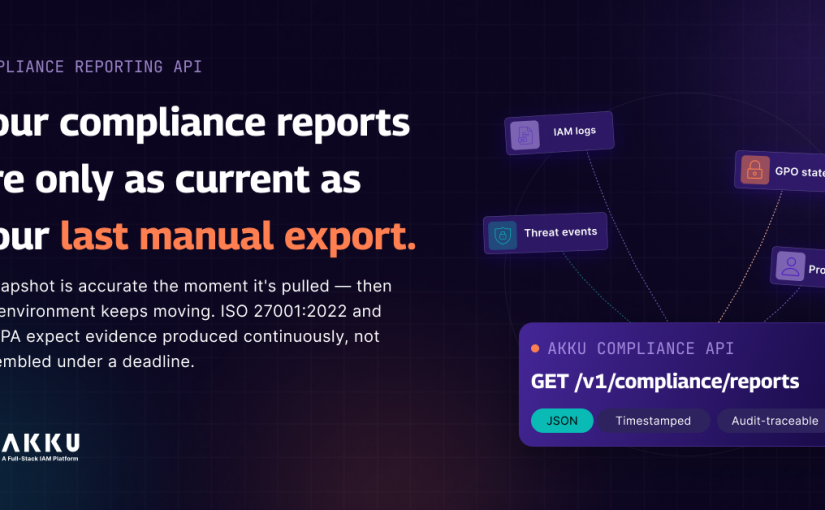
Your Compliance Reports Are Only as Current as Your Last Manual Export

When did you last run a compliance evidence collection that did not surface something unexpected?

Not a gap in your controls. Something more mundane than that. A SCIM connector that failed three weeks ago that nobody noticed because there was no monitoring on it. A provisioning record that shows an offboarded user as deprovisioned, but the application itself still has the account active because the sync did not complete. A GPO configuration that drifted during a patch cycle and was never reverted. None of these are dramatic failures. They are the kind of thing that shows up when someone starts pulling data for an audit and the data does not match what the platform said it was.

The reason this keeps happening is not carelessness. It is architecture. The evidence that compliance audits require does not live in one system. Authentication logs live in the IAM platform. GPO configuration states live in Active Directory. Threat detection events live in the SIEM or the security monitoring layer. Provisioning records live in whatever system runs your identity lifecycle. Getting all of that into one place, in a format an auditor can use, requires a person to do it manually every single time.

That person assembles the evidence. They reconcile the formats. They discover the gaps. They fix what can be fixed before the package goes out. And the package that results reflects the state of the environment during the collection window. Not today. The window when someone was pulling data. 

This blog is about why that architecture cannot satisfy what ISO 27001:2022 and DPDPA Rules 2025 actually require at the evidence level, and what changes when compliance data becomes something your systems produce continuously rather than something your team assembles under a deadline.

The Evidence Collection Problem Is Not a Process Problem. It Is an Architecture Problem.

Most compliance teams treat audit preparation as a sprint. In the weeks before an audit, the team runs harder, pulls more data, and patches what they can before the auditors arrive. The sprint is exhausting and it is built into the annual calendar as an accepted cost.

But the sprint is not the real problem. The sprint is a symptom of a compliance architecture where evidence only gets collected when someone needs it. Between audits, controls drift. Connectors fail. Policies get modified and not reverted. None of that is visible because nobody is looking. The audit creates the forcing function to look, which is why the looking almost always surfaces something.

The architecture problem has three specific components that compound each other. 

No Unified Evidence Surface 

The data that compliance audits require is distributed across systems that were not designed to produce evidence together. The Akku IAM platform holds authentication events and provisioning records. Active Directory holds GPO configuration states. Your SIEM holds threat detection events. Your ticketing system holds access request and approval records. Each of these is a valid data source. None of them produce a unified, audit-ready output without a person in the middle connecting them.

The practical consequence: every audit cycle requires someone to navigate each system, export data in that system’s native format, reconcile the exports, and reformat everything for the auditor’s requirements. For organisations managing compliance across ISO 27001, SOC 2, HIPAA, and DPDPA simultaneously, the same data gets extracted and reformatted multiple times for different framework requirements.

Evidence Is Always Retrospective

Manual evidence collection produces a snapshot. The snapshot is accurate at the time it is taken. By the time it reaches the auditor, the environment has continued to evolve. If your MFA enforcement policy was modified for a department two weeks after the evidence was collected, that modification is not in the compliance package. The auditor is reviewing a state that no longer exists.

ISO 27001:2022 Annex A Control A.8.16 requires ongoing monitoring for anomalous behaviour. The 2022 revision was explicit about this: the standard moved from periodic review to continuous monitoring. A compliance programme that collects evidence periodically and reviews it before audits does not satisfy A.8.16 as written in the current version of the standard. It satisfies the 2013 version’s intent. That distinction matters at recertification.

Gaps Are Found During Collection, Not Before

The most operationally damaging aspect of manual evidence collection is that it is often the first time anyone discovers that something went wrong. The SCIM connector failure that left offboarded users with active entitlements is discovered when someone cross-references the HR departure log against the provisioning records during audit prep. The GPO drift is discovered when someone exports the current configuration and compares it manually against the baseline. The discovery happens at the worst possible time, when the audit is imminent and there is no runway to investigate properly.

A compliance architecture that detects these gaps continuously rather than at collection time changes the operational dynamic entirely. The gap is found when it opens, not when the auditor is two weeks away.

What ISO 27001:2022, DPDPA Rules 2025 and RBI Actually Require at the Evidence Level

The frameworks that govern financial services, healthcare, and ITeS organisations in India are not ambiguous about what evidence they expect. But there is a meaningful gap between what the frameworks say and what most compliance programmes produce.

ISO 27001:2022: Continuous Monitoring Is the Requirement, Not the Aspiration 

Control A.8.15 requires that event logs recording user activities, exceptions, and information security events are produced, stored, protected, and analysed. The key word is analysed. A log that is stored but only reviewed before audits has not been analysed in any operationally meaningful sense. The control requires active review, which implies continuous or near-continuous monitoring rather than periodic batch review. 

Control A.8.16 is more direct. It requires ongoing monitoring of networks, systems, and applications for anomalous behaviour. The 2022 revision added this requirement specifically because the 2013 version’s periodic review approach was insufficient. An organisation that reviews authentication logs quarterly is not satisfying A.8.16. An organisation with a monitoring layer that evaluates authentication events continuously is.

The practical implication for compliance reporting: the evidence package that an ISO 27001:2022 audit expects is not a quarterly snapshot. It is evidence that the monitoring controls were operating continuously over the audit period. That evidence can only come from a system that was actually monitoring continuously, not from a system that collected data before the audit.

DPDPA Rules 2025: Access Accountability Has to Be Demonstrable on Demand

The Digital Personal Data Protection Act requires data fiduciaries to implement appropriate technical and organisational measures to protect personal data. The word appropriate is doing significant regulatory work here. Under DPDPA, an appropriate technical measure for access control is not a policy document and not an annual access review. It is a technical system that can demonstrate, at any point, that access to personal data is restricted to authorised individuals, that access rights are reviewed and kept current, and that access is removed when it is no longer required. 

The data protection board under DPDPA has broad investigatory powers. A supervisory review does not arrive with six weeks of notice. It can arrive when something has gone wrong. If your ability to demonstrate access accountability depends on a manual evidence collection process that takes several days to run, your compliance posture for DPDPA is contingent on having time to prepare. That is not an appropriate technical measure. That is a documentation process.

DPDPA compliance for organisations handling personal data at scale requires that the access accountability evidence is continuously maintained and retrievable on demand. Not assembled when asked for it.

RBI Cybersecurity Framework: Near-Real-Time Is the Stated Standard

The RBI Cybersecurity Framework for scheduled commercial banks requires near-real-time log analysis and audit trails that support forensic investigation. For financial services organisations under RBI oversight, the expectation is that authentication anomalies, privileged access events, and configuration changes are being monitored as they occur. The audit trail exists as a byproduct of that monitoring, not as a separately assembled evidence package.

For organisations currently satisfying RBI requirements through periodic log review, the gap between the framework’s stated standard and the current implementation is a matter of regulatory record. The framework is explicit. The implementation is not matching it.

What Changes When Compliance Data Is Produced Continuously Instead of Collected Manually

The Akku Compliance Reporting API provides a single REST endpoint that returns consolidated compliance data programmatically, on demand or on a configured schedule. Rather than requiring a person to log into multiple systems and extract data, the API produces structured JSON output that covers the three evidence domains auditors request most frequently across ISO 27001, SOC 2, HIPAA, RBI, and DPDPA reviews.

Authentication Events and Login Activity

The API returns total login counts, success and failure rates, MFA failure events with method attempted and failure reason, account lockout events, and recovery attempt activity. Each event is timestamped at the millisecond level and tied to a user identifier. The output is structured JSON compatible with direct ingestion into GRC platforms like ServiceNow GRC and Archer, and into SIEM platforms including Splunk, IBM QRadar, and Microsoft Sentinel. For ITeS and BPO organisations that face client audits with short notice and need to produce structured authentication evidence quickly, this changes the response time from days to the duration of an API call.

GPO Configuration State and Change History

GPO configuration is one of the most frequently requested evidence categories in ISO 27001 and RBI audits. The auditor wants to know what policies are applied, whether they match the required baseline, and whether anything has changed since the last review. Currently, producing that evidence requires a manual export from the Group Policy Management Console, a comparison against a separately maintained baseline document, and a reconciliation of any differences.

The API returns the current GPO configuration state and change history in a structured format. The output identifies what is applied, what changed, when it changed, and what it changed from. The reconciliation step is eliminated because the change history is part of the output rather than a manual comparison.

Threat Detection Events

Threat detection events, authentication anomalies, privilege escalation attempts, and account lockout patterns form the evidence base for demonstrating that detection controls are operating under ISO 27001 A.8.16 and SOC 2 CC7.1. This data currently requires extraction from the security monitoring layer and manual formatting for audit packages. The API consolidates this into the same structured output as authentication events and GPO configuration. A single API call covers all three evidence domains.

How This Fits Into a Broader IAM and PAM Architecture

The Compliance Reporting API is a reporting surface. The quality of the evidence it produces depends on the quality of the controls generating the underlying data.

Authentication events come from the Akku IAM platform handling your organisation’s identity and access management. GPO configuration state comes from your Group Policy environment managed through Akku. Threat detection events include session-level activity captured by AkkuReka, the session proxy component in Akku PAM, which records command-level activity from privileged SSH, RDP, and database sessions.

For teams that have implemented IAM and PAM and are currently spending several days per audit cycle manually assembling evidence, the API eliminates the assembly step without requiring changes to the underlying architecture. The controls already exist. The API makes their output accessible in the format auditors need.

Before You Move On

Pull your last compliance evidence package. Pick any three controls in it that required authentication or access data.

For each one: how many systems did someone log into to collect that data? How long did the collection take? And when the package was complete, how confident was the team that the data reflected the current state of the environment rather than the state during the collection window?

If any of those controls are relevant to DPDPA, add a fourth question: if a data protection board review arrived tomorrow and required you to demonstrate access accountability for those controls as of today, how long would it take to produce that evidence?

The answers define the gap between your current compliance reporting architecture and what the frameworks you are audited against are starting to require. The Compliance Reporting API closes that gap at the data layer. The compliance score and control checkpoints are viewed at the monitoring layer. Evidence on demand is not the same as continuous visibility. But it is the starting point. 

See Akku PAM Compliance Capabilities  |  Talk to the Akku Team

Questions Security and Compliance Teams Ask About Compliance Reporting APIs

Q: What is the difference between a compliance reporting API and a GRC platform?

A: A GRC platform manages compliance workflows: control assignments, evidence uploads, risk registers, and audit scheduling. It depends on evidence being fed into it, either manually or through integrations. A compliance reporting API is an evidence source. It produces structured, audit-ready data from live system state that can be fed into a GRC platform, a SIEM, or a custom dashboard without manual extraction. The two are complementary. The GRC platform is where compliance is managed. The reporting API is where the underlying evidence comes from. For teams that already have a GRC platform but are manually extracting evidence to feed it, the API addresses the extraction step, not the management layer.

Q: Which specific ISO 27001:2022 Annex A controls does the Compliance Reporting API produce evidence for?

A: The API produces evidence relevant to A.8.15 (Logging), which requires that user activity and security event logs are produced, stored, and analysed. It produces evidence for A.8.16 (Monitoring Activities), which requires ongoing monitoring for anomalous behaviour. It supports A.5.15 (Access Control) and A.5.18 (Access Rights) through the authentication event and provisioning record output. GPO configuration data supports controls in the A.8 group that require specific system hardening and configuration baseline management. The full control-to-evidence mapping for Akku’s compliance capabilities is documented on the Akku compliance use case page. 

Q: What does the DPDPA Rules 2025 compliance requirement mean practically for how authentication evidence is stored and produced?

A: Under DPDPA, data fiduciaries must implement technical measures demonstrating that access to personal data is controlled, reviewed, and removed when no longer required. At the evidence level, this means the access record needs to show who had access, when access was granted, under what authorisation, and when it was removed. The access record needs to be producible on demand, not assembled when requested. The Compliance Reporting API produces authentication event data that includes user identifiers, timestamps, and access patterns in structured JSON. For organisations currently relying on manual log exports to satisfy DPDPA obligations, the shift to API-based evidence production changes the response time from days to seconds.

Q: How does the API handle evidence for organisations managing multiple compliance frameworks simultaneously?

A: The API output is framework-agnostic. The same structured JSON covering authentication events, GPO configuration state, and threat detection events is relevant to ISO 27001, SOC 2, HIPAA, RBI, SEBI CSCRF, and DPDPA. The difference between frameworks is which specific fields and time windows the auditor focuses on, not which underlying data is required. For organisations that currently run separate evidence collection processes for each framework, the API output serves all of them from a single call.

Q: What is the latency between a system event occurring and it being available through the API?

A: Events are written to the Akku audit log in near-real-time as they occur. The API reflects the current audit log state with low query latency. For compliance reporting purposes, the API supports both on-demand queries and scheduled retrieval. For monitoring use cases where near-real-time event data is needed for SIEM detection rules, the API supports real-time streaming retrieval. The authentication event output is the same data that feeds the MFA Failures and Login Metrics APIs, both of which are designed for near-real-time consumption.

Q: How does the Compliance Reporting API fit into the broader Akku compliance architecture?

A: The reporting API is one layer of a three-layer compliance architecture in Akku. The compliance score and per-framework breakdown provide the executive summary layer: a continuously updated score across ISO 27001, SOC 2, HIPAA, GDPR, DPDPA, RBI, and SEBI CSCRF, exportable for board reports. The control checkpoints view is the operational layer: every control, its live pass or fail status, the evidence behind it, and the specific fix action where a gap exists. The reporting API is the integration layer: structured evidence output consumable by external GRC platforms, SIEM tools, and custom dashboards. For organisations implementing all three layers, compliance evidence stops being something assembled before audits and becomes a continuous operational data surface.

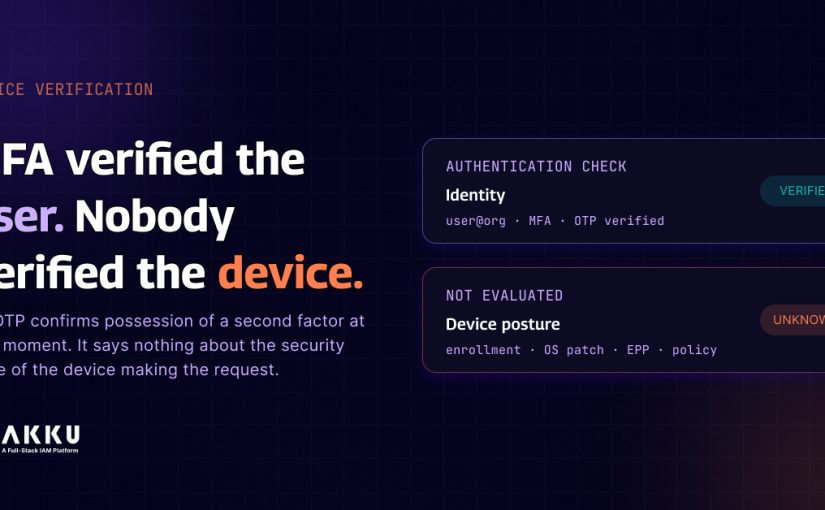
MFA Verified the User. Nobody Verified the Device.

Your user authenticated this morning. They presented the right credentials. They completed the MFA challenge. Your access control system granted the session.

Here is what your authentication stack evaluated during that process: the identity of the person requesting access.

Here is what it did not evaluate: the security posture of the device they used to request it.

Whether the device was enrolled in any management system. Whether the OS had been patched in the last four months. Whether endpoint protection was running. Whether the device had been compromised. Whether it was a personal phone with no corporate security policy applied to it at all.

For most MFA deployments, none of these questions is part of the authentication decision. And in environments with distributed workforces, BYOD, and high-turnover teams, that gap is not a minor implementation detail. It is a structural exposure that exists at scale, every day, across every session that passes through an authentication layer designed to verify identity, but not endpoint security posture.

Why MFA Is an Identity Assertion, Not a Device Health Assertion

This distinction is worth being precise about because it is frequently misunderstood at the architecture level.

When a user authenticates with an OTP-based second factor, whether TOTP through an authenticator app, SMS OTP, or a push notification, the verification confirms one thing: that the person authenticating has access to the enrolled second factor at that moment. It confirms possession of a device or account associated with the enrolled factor. It says nothing about the security state of the device making the authentication request.

Certificate-based device authentication is different. When a device certificate is presented during authentication, the certificate is issued to a specific enrolled device, and the authentication proves that the request originated from a device holding that certificate. This is closer to device verification, but it still does not confirm the current security posture of the device. A certificate-enrolled device can be compromised, out of compliance with OS patching, or running prohibited applications. The certificate is present. The device may not be safe.

Genuine device verification requires something different: a real-time check of the device’s compliance state against defined policy criteria at the point of every access request. Not a check that was performed during enrollment and cached. A current check at the moment of the session. This is the principle behind zero-trust access security applied specifically to the endpoint layer.

The Environments Where This Gap Is Most Consequential

The device verification gap matters everywhere, but it is most consequential in specific environments because of how work actually happens in them.

ITeS and BPO organisations handling client financial, healthcare, or legal data operate under contractual obligations that specify data handling requirements at the endpoint level. A client contract that requires corporate-managed devices for accessing client data is violated the moment a team member accesses that data from a personal, unmanaged phone, regardless of whether their authentication credentials are valid. The authentication layer does not enforce the contract. A device compliance check does.

The ITeS and BPO industry in India handles some of the most sensitive data in the world on behalf of international clients. The workforce is large, distributed, and high-turnover. Remote work is the default for many roles. The probability that a significant portion of daily access happens from unmanaged personal devices is not theoretical. It is the operational reality. This is precisely what making your BYOD policy more secure means in practice: not a stricter policy document, but a technical control that enforces the policy at the access layer.

Healthcare organisations accessing Electronic Health Records face DPDPA obligations around how patient data is accessed at the device layer. An unmanaged device with no remote wipe capability that accesses patient records creates a data protection exposure that MFA does not address. If that device is lost or stolen, the data accessed during its last session has no technical protection once the authentication session is closed. Remote Security and Data Wipe through Akku MDM allows IT to remove work profile data without affecting personal content, but only from devices that were enrolled and managed in the first place.

Financial services firms under RBI and SEBI oversight face specific endpoint security requirements in the frameworks governing their cybersecurity posture. Unmanaged devices accessing trading systems, customer account data, or financial records represent a documented compliance gap in an audit context.

What Device Compliance Verification Actually Requires at the Architecture Level

Closing the device verification gap requires the access decision to incorporate device state, not just identity state. At the architecture level, this means the session proxy or access control layer must be able to query the device management system for the current compliance status of the requesting device before granting access.

The check needs to evaluate specific, configurable criteria. Device enrollment status in the MDM system. OS version compliance against minimum requirements. Endpoint protection status. Screen lock policy compliance. Data transfer restrictions. These are not binary enrolled or not enrolled checks. They are policy-based compliance evaluations against criteria the organisation defines through Device and Access Policy Enforcement.

The access decision then reflects both identity verification and device compliance. An authenticated user on a non-compliant or unenrolled device is denied access, not because their identity is invalid, but because the device through which they are authenticating does not meet the policy requirements for the data they are trying to access.

How Akku MDM and AkkuReka Enforce This Together

Akku MDM provides the device management and compliance layer. Device enrollment, policy application, and compliance monitoring are managed centrally from a single console across Android and iOS devices. The platform enforces specific device policies, including passcode requirements, screen capture restrictions, camera and microphone governance, and USB and Bluetooth data transfer controls through Device and Access Policy Enforcement. Application governance is handled through App Governance and Whitelisting, ensuring users can only access approved applications on managed devices.

For BYOD environments, Work Profile Isolation separates corporate applications and data from personal applications on Android devices, with enforced boundaries that prevent cross-profile data movement. Corporate data remains under IT control even on personally owned devices. If a device is lost or compromised, Remote Security and Data Wipe allows IT to remove work profile data without affecting personal content.

The compliance verification connects directly into the AkkuReka session proxy and the broader Akku access control layer through the Security Hardening and Zero-Trust Posture framework. When a session is requested, AkkuReka evaluates identity through Akku IAM, device compliance through the MDM system, and contextual factors, including IP, location, and time of day, through Contextual Access Control. A device that fails the MDM compliance check is blocked before the session opens, regardless of whether MFA is passed.

The adaptive MFA layer adds behavioural anomaly detection on top of device compliance verification. The system evaluates the context of every access request against the user’s established patterns. When a request deviates from normal behaviour, such as a new device, an unexpected location, or an unusual time of day, the system escalates the authentication challenge even if the device is enrolled and compliant. Identity verification, device compliance, and contextual behaviour work together as a unified zero-trust verification chain rather than as independent checks.

The same policy engine governs both SaaS application access and privileged server access through Akku PAM. An employee authenticating to a business application and an administrator requesting a privileged server session both pass through the same device compliance check. The policy is consistent across the entire access surface. For teams that need to work from any location securely, the work from anywhere use case covers how device compliance enforcement integrates with the broader remote access security model.

For organisations building out a BYOD security posture, the BYOD security use case covers how device enrollment, work profile isolation, and policy enforcement work together in practice. For teams managing compliance obligations under GDPR, HIPAA, NIS2, or DORA alongside DPDPA, the compliance use case page covers how Akku’s controls map to each framework’s specific access and endpoint requirements.

The Questions Worth Asking About Your Current Setup

Look at the access requests that came through your authentication system in the last thirty days. For each one, answer honestly.

Do you know whether those requests originated from managed, enrolled devices or from personal devices with no corporate security policy applied?

If a device used to access corporate data in that period was lost or stolen today, what data accessed during its last session would be exposed, and what technical control would limit that exposure?

For your ITeS or healthcare teams accessing client or patient data from home: is there a technical mechanism verifying device compliance before access is granted, or is the BYOD policy a document that relies on user compliance?

If your organisation underwent a DPDPA or ISO 27001 audit next month and the auditor asked you to demonstrate that access to personal data is limited to compliant, managed devices, what evidence would you produce?

If any of those questions produced a gap rather than a clear answer, the device verification layer in your access architecture is carrying exposure that MFA alone is not designed to close.

See How Akku MDM Works | See How Akku Enforces Zero-Trust at Every Session | Talk to the Akku Team

Questions IT and Security Teams Ask About Device Verification and MFA

Q: Why does passing MFA not mean the device is secure?

A: MFA verifies identity. It confirms that the person authenticating has access to the enrolled second factor at that moment. It does not evaluate the security posture of the device making the authentication request. An OTP challenge confirms possession of an authenticator app or phone number. It says nothing about whether the device is enrolled in an MDM system, running a compliant OS version, protected by endpoint security software, or in a compromised state. Identity verification and device health verification are separate technical checks that require separate mechanisms.

Q: What is the difference between device enrollment status and device compliance status?

A: Enrollment status confirms that a device is registered in the MDM system and subject to management. Compliance status confirms that the device currently meets the specific policy criteria defined through Device and Access Policy Enforcement: OS version, passcode strength, endpoint protection active, and prohibited applications absent. A device can be enrolled but non-compliant if it has fallen out of policy since enrollment. Genuine device verification checks compliance state at the point of every access request, not just at enrollment.

Q: How does Work Profile Isolation protect corporate data on personally owned BYOD devices?

A: Work Profile Isolation on Android devices creates a separate, isolated container for corporate applications and data. Applications within the work profile cannot share data with personal applications. Copy and paste between profiles is restricted. Files from the work profile cannot be shared externally through personal applications. Corporate data remains under IT control within the work profile boundary. If the device is lost, IT can remotely wipe the work profile data through Remote Security and Data Wipe without affecting the user’s personal data.

Q: What happens technically when a non-compliant device attempts to access corporate resources through Akku?

A: When a session is requested, AkkuReka evaluates the compliance status of the requesting device through the MDM system as part of the zero-trust verification chain. If the device fails the compliance check, regardless of whether MFA passed, AkkuReka denies the session before it opens. The event is logged. No session is created. No data is accessible.

Q: What compliance frameworks specifically reference endpoint or device-level access controls?

A: ISO 27001 Annex A control A.6.2 covers mobile device policy and teleworking requirements, including device management. The RBI Cybersecurity Framework specifies endpoint security requirements for BFSI organisations. DPDPA requires data fiduciaries to implement appropriate technical measures to protect personal data, which regulators interpret as including endpoint controls for devices accessing personal data. HIPAA’s Physical Safeguard requirements at 45 CFR 164.310 include workstation use and device controls. Akku’s approach to meeting these requirements is covered on the compliance use case page.

ISO 27001 Implementation Guide 2025: How Akku Supports Your Compliance Journey

ISO 27001 certification is quickly becoming a baseline requirement for any organization that handles sensitive data. But implementing ISO 27001 and staying compliant is no small feat. With over 190 clauses and controls, most of which are technical and complex, the process can feel overwhelming.

That’s where Akku comes in. Akku is a cybersecurity platform that helps automate and enforce key ISO 27001 controls, especially ones related to access management, monitoring, and user behavior. While Akku is not a Governance, Risk, Compliance (GRC) platform, it plays an important role in helping organizations move forward on the path to certification.

What is ISO 27001, and Why is it Important?

ISO 27001 is the international gold standard for information security management. It provides a structured approach to managing sensitive data by defining an Information Security Management System (ISMS) and applying a list of carefully designed controls.

If you’re wondering what ISO 27001 is, think of it as a framework that helps you protect your company’s data, systems, and infrastructure against both internal and external threats. This includes risks like cyberattacks, human error, insider threats, and more.

So, why is ISO 27001 certification important?

  • It proves to your clients and stakeholders that you take data protection seriously. 
  • It helps you comply with legal and regulatory requirements. 
  • It boosts your credibility and competitive edge in sectors like IT, finance, healthcare, and manufacturing. 
  • It prepares your organization to respond effectively to incidents and reduce downtime. 

ISO 27001 Implementation: A Practical Step-by-Step Guide

Successfully implementing ISO 27001 involves more than ticking off items in a checklist. You need to integrate security into your day-to-day operations and ensure your systems can prove compliance consistently.

Here’s a simplified step-by-step ISO 27001 implementation guide:

  1. Define the ISMS scope
    Identify what parts of your organization the ISO 27001 controls will apply to—people, systems, processes, and data. 
  2. Conduct a risk assessment
    Understand what threats your business faces, how likely they are to occur, and what impact they would have. 
  3. Identify applicable controls
    Select the right ISO controls from the ISO 27001 controls list that are relevant to your environment. 
  4. Create and implement policies
    Define clear information security policies and procedures, and ensure they’re followed. 
  5. Implement technical controls
    Technical controls for ISO 27001 certification include access management, monitoring, MFA, secure tunneling, and logging – tools like Akku help automate these controls. 
  6. Train your team
    Everyone should understand their roles in keeping data secure. 
  7. Monitor and audit
    Conduct internal audits and fix gaps before inviting a certification body. 
  8. Apply for certification
    Engage a third-party certifier who will assess your ISMS and issue the ISO 27001 certificate. 

ISO 27001 Checklist and Compliance Tools

A good ISO 27001 checklist includes:

  • Information security policy 
  • Access control mechanisms 
  • Risk treatment plans 
  • Evidence of user training 
  • Session and audit logs 
  • MFA policies 
  • Incident response plans 
  • Backup and recovery protocols 

Akku simplifies your ISO 27001 compliance checklist by automating access control, user provisioning, authentication policies, audit trails, and session monitoring—core components of ISO 27001 compliance.

Benefits and Advantages of ISO 27001 for Your Organization

The benefits of ISO 27001 certification go beyond regulatory checkboxes. Here’s why many organizations invest in it:

  • Improved data security
    ISO 27001 ensures that your business protects its critical data from leaks, breaches, and cyberattacks. 
  • Increased stakeholder trust
    Being ISO 27001 certified shows clients and partners that your security practices meet international standards. 
  • Better process control
    You build structured, repeatable processes that reduce errors and improve accountability. 
  • Regulatory compliance
    ISO 27001 helps you meet legal and contractual requirements related to data security. 
  • Market advantage
    More companies now demand ISO 27001 certification from their vendors, making it a business enabler. 

ISO 27001 Certification in India: What You Should Know

Many organizations in India, especially in tech-forward cities like Chennai, are working toward ISO 27001 certification. But getting certified is not just about paperwork.

The ISO/IEC 27001:2022 version includes 199 clauses and controls. Of these, 97 must be implemented manually. The remaining 102 can be partially or fully automated, but even those can be technically complex.

If you’re researching ISO 27001 certification cost in India, consider both direct and indirect expenses:

  • Consultation and documentation 
  • Security tools and technologies 
  • Internal manpower and training 
  • Audit preparation and certification body fees 

Akku helps reduce these costs by automating many of the controls listed in the ISO 27001 controls list. You won’t get certified just by using Akku, but it helps you satisfy more of the required clauses faster and more accurately.

So if you’re looking for ISO 27001 certification in Chennai or anywhere else in India, Akku helps shorten your path to readiness.

Why Choose Akku for ISO 27001 Implementation Support

Akku helps you check off some of the most technically demanding items in the ISO 27001 compliance checklist.

Here’s how:

Access Controls and User Management

  • Enforce role-based access (RBAC) 
  • Track privileged users 
  • Apply multi-factor authentication (MFA) and adaptive MFA 
  • Automate user provisioning and de-provisioning tied to HR changes 

Policy Enforcement

  • Centralized policy management 
  • Map security objectives to operational controls 
  • Align policies across on-prem, cloud, and hybrid systems 

Monitoring and Logs

  • Track user activity with detailed audit trails 
  • Detect anomalies and potential threats 
  • Continuously assess your security posture 
  • Generate reports that match ISO 27001 compliance formats 

Akku fully addresses 30 ISO 27001 controls and partially addresses 34 more. The other controls either require manual input or other non-cybersecurity tools, but Akku integrates easily with these platforms as well.

If you’re looking for a practical solution to reduce the burden of compliance, Akku offers real value.


So, FInally: 

ISO 27001 certification isn’t easy, but it’s worth it. It helps you protect your data, build trust, and open new business opportunities. With Akku, you get help where it’s needed most, automating some of the most challenging requirements and making your cybersecurity efforts measurable.

Want to know more about how Akku supports ISO 27001 certification? Ask us for a detailed walkthrough of the specific clauses Akku helps you address. Let’s simplify your compliance journey, one control at a time.

BYOD Security & Compliance: How Akku’s Device-Based Access Controls Protect Your Data


A staggering
82% of organizations now have a BYOD (Bring Your Own Device) program in place, with 68% reporting a boost in productivity after making the switch. Also, companies that adopt BYOD smartphones can save up to $341 per employee. However, with these advantages comes risk — data loss remains the top concern for organizations, especially with stats showing about 50% of employees fail to change their passwords after a data breach.

It’s clear these risks need to be addressed, a solution that incorporates device-based access controls along with necessary security to protect data while maintaining the flexibility of BYOD.

So what are the key security challenges in a BYOD world?

1. Data leaks

Personal devices are more prone to data breaches, as sensitive information may accidentally or intentionally be shared with unauthorized individuals. Reports are that the major security barriers include data leakage or loss (62%), downloading unsafe apps (54%), and stolen devices (53%). Despite these concerns, many organizations are still blind to the risks, with 49% unsure if malware has compromised their networks via BYOD.

2. Lost or stolen devices

When a device containing corporate data is lost or stolen, it poses a serious risk, as unauthorized users could gain access to critical information. Stats show that though 70% of BYOD applies to employees, other groups such as contractors (26%), partners (21%), customers (18%), and suppliers (14%) also access corporate networks, raising the stakes.

3. Malware and virus threats

Personal devices are not always equipped with the same level of security as company-issued ones, making them vulnerable to malware and viruses, which could compromise data integrity. Microsoft’s Digital Defense Report 2023 says BYOD should stand for “bring your own disaster” and reveals that about 90% of ransomware attacks in the past year stemmed from unmanaged devices, typically personal gadgets brought in from home that lack sufficient security protections. With global ransomware attacks skyrocketing by more than 200%, organizations adopting BYOD policies are unwittingly exposing their networks to substantial risks.

Akku’s device-based access controls

With Akku Access Manager, admins can easily whitelist approved devices, so only authorized devices like company-owned laptops or specific mobile devices can access your organization’s applications.

How does it work?

  • The Akku Agent is installed on the device to be whitelisted, similar to how you would install any other app
  • The Akku Agent authenticates the user account details to be activated
  • It then captures the device’s serial number and securely stores it on Akku’s server, linked to the user’s account
  • Each time the user attempts to log in, Akku compares the device’s serial number with the list of approved devices associated with that user
  • If the serial number matches, the user is granted access
  • If the user tries to log in from an unapproved device, access is denied

This system ensures that only trusted devices gain access to the company’s network, reducing the risks of unauthorized logins and data breaches.

With a device-based access control implemented, here’s how Akku protects your data.

1. Device authentication

Akku’s access controls ensure that only devices that meet your organization’s security criteria are permitted to access the network. For example, Akku uses an agent to grab the serial number and BIOS UUID from each user’s device, linking it to their profile. This makes sure that only the devices registered to a specific user can access their account.

2. Access controls and compliance

The BYOD policy should clearly define the permitted and prohibited use of personal devices within the workplace. It must also cover security, privacy concerns, and potential liabilities in case of breaches. With Akku Access Manager, admins can also set time limits for when users can access your organization’s apps. This feature makes sure that access is only allowed during certain time windows, adding another layer of security and control.

3. Real-time monitoring and reporting

Smart Analytics in Akku Access Manager keeps track of both successful and failed login attempts. It logs who’s trying to access which apps, along with details like the time, location, and authentication methods used. You also get insights into which AMFA checks are triggered most often, helping you prioritize those factors to make the login experience smoother for users. And it’s all in real-time.


It is time to take control of your BYOD security, compliance, and monitoring. Explore how Akku’s device-based access controls can protect your data!

HR productivity being sapped by On- and Off-boarding, L&D, and Compliance? An IAM could be what’s missing.

The synergy between Identity and Access Management (IAM) and IT, cybersecurity, and admin departments of an organization is obvious, but another department in an enterprise that is equally advantaged by IAM is Human Resources. You see, IAM doesn’t just help keep the bad guys out. It works to make life easier for the good guys as well.

HR is already challenged by large and scattered workforces – a scenario accelerated by the pandemic – and therefore having a framework of business processes, policies, and technologies can facilitate better management of employees. To a large extent, this is exactly what an IAM does.

Here are four ways IAM can help with Human Resources.

1. Seamless Employee On-boarding/Off-boarding

IAM facilitates automated and monitored on-boarding and off-boarding of employees in several ways. An important part of how this is achieved is that during the provisioning process an IAM creates a single account for each user, to which you can assign access to all necessary apps.

What would otherwise take HR days can now be done in minutes – which means that employees can hit the ground running on their first day, turning new hires into productive members of the team faster than ever. Also, IAM ensures employees only have the permissions they need, helping maintain security.

The off-boarding transition too is faster as deprovisioning is automated by IAM, and keeps the organization safe from unauthorized access to applications and data by former employees. This can go a long way in ensuring privacy and security.

Without a centralized IAM system, provisioning and deprovisioning need to be done manually, which means a longer time for employees to gain productivity, and also longer before employees are removed from the organization’s system, leaving the door open to security risks.

2. Efficient Learning and Development

IAM is all bringing all users onto a common platform for easier management. This basic concept lends itself perfectly to also delivering communication and training to all employees across the organization through the same system. 

It is easier to roll out mandatory training content through the IAM dashboard to employees who are registered on the IAM, and track progress. Content too can be tailormade for employees based on their function or department. The IAM can therefore replace a Learning Management System in the roll-out of several types of communication or training.

3. Improved Employee Relations

Human Resources today are dealing with an increasingly distributed workforce – this has its upsides, but also cuts employees off from a traditional office setting. So, how do you work on improving those relationships, maintaining a consistent experience for employees connecting to corporate resources from across the country or world, and without sacrificing security?

Just as with the roll-out of mandatory training, an IAM is an ideal platform to also roll-out messages, announcements and notices to employees across the organization. New members can be assisted with orientation and find their feet faster with the smooth onboarding process that an IAM enables. And even little things like simplifying admin issues – such as forgotten passwords or a simple, pain-free addition of required access permissions – can make operations much smoother for every member of the team.

4. Comprehensive Documentation and Compliance

A strong IAM solution can support compliance with regulatory standards, automate audit reporting and simplify processes for regulatory conformance. Detailed and comprehensive logging is a big part of this.

Maintaining verifiable proof of consumption of critical communications and mandatory training by employees plays an important role in demonstrating compliance to standards. Additionally, custom-built forms for maintaining up-to-date documentation on team members ensure appropriate and accurate data on record at all times, while automated deprovisioning helps support an employee’s right to be forgotten.

Security, productivity, and compliance – the right IAM, like Akku, can build and enforce both of these organization-wide for HR departments across industries. We’d love to tell you more about it. Contact us today for a consultation.

The twin benefits of IAM: Streamlining compliance processes and security

Process reliability, transparency, traceability, and flexibility – the four aspects of modern IT security. An Identity and Access Management solution (IAM) is the foundation for all four.

IAM plays an important role in regulatory compliance. To achieve certifications like ISO and meet standards such as the European General Data Protection Regulation (GDPR), an enterprise needs to ensure strong documentation and process standardization, provided for by a robust IAM program. With live data and analytics from the IAM, you can confirm you are standards-compliant, any time. You don’t need to scramble for documentation at audit time.

The right IAM provides availability of information and automated security measures result in faster processing, compliance with legal regulations, fewer violations, and reduced vulnerability. Here’s what to look for when selecting your IAM solution provider.

Are the access logs being maintained?

Maintaining logs ensures that no one accesses the server without being accounted for. With the right IAM, such as Akku, every entry to the data host server, and every server activity, is accounted for with timestamps. 

Akku ensures double security and accountability. If an Akku executive needs server access, your IT admin will receive an OTP for authentication; both need to be logged on simultaneously for access by either. It applies the principles of ‘zero trust’ or ‘least privilege’, wherein all traffic is authenticated, authorized, and continuously validated at all times.

Are you receiving instant alerts?

The GDPR requires that any information that can identify a person be protected – from their personal and contact details to their bank accounts and health records and even their political views. GDPR requires that all data breaches be reported within 72 hours. Your solution provider must enable you to do this. Akku, for instance, sends instant alerts upon encountering any suspicious activity.

Is your solutions provider enforcing password policies?

Passwords are integral to cybersecurity; they are an organization’s first line of defense. However, according to the 10th edition of the Verizon Data Breach Investigations Report, 81% of hacking-related breaches leveraged stolen and/or weak passwords. 

That’s why you need documented proof of strong passwords, and enforceable policies in place to make sure the passwords are indeed strong and secure. One solution is when the IAM’s default password policy is itself compliant with industry standards, as is the case with Akku. It can be further customized based on your organization’s compliance needs. If you need more information on this, do get in touch with the executives at Akku.

Are you “forgetting” employees the right way?

To comply with GDPR, you need to respect ex-employees’ “right to be forgotten”. Employee data can be stored only for a specific purpose. For instance, if you use an employee’s information for a seminar in April with their consent, you cannot use it again in December without their explicit consent. Also, there may be contractual or self-employed workers, and data protection regulation requires that you delete their data once they have left the organization. Since IAMs like Akku manage the entire user lifecycle, one-point deprovisioning and deletion of records makes this easy.

What about managing internal communication?

Certain employee training programs and surveys are mandatory for compliance with  the various norms and laws. While it isn’t a standard feature in all IAMs, some solutions like Akku offer an internal messaging feature. Using this, videos and other content can be rolled out seamlessly for continuous learning. 

Can you check app usage?

Does your IAM solution provider allow you to track all aspects of activity on your server environment? They ought to, as this gives you a better understanding of patterns of usage, actual utilization, and other useful information. Using this data, you can make decisions like whether you need to upgrade the server, increase or decrease the number of app licenses, and so on. Akku is one of the IAMs that provide this facility.

If you are looking at improving audit compliance and making standardization easier, it’s important to roll out an effective Identity and Access Management solution that works for your unique needs. Connect with Akku to learn more.

Navigating the World of Data Security in the Cloud: Steps to Ensure Compliance

Compliance ensures that an enterprise maintains a minimum standard of security-related requirements in accordance with industry and regulatory standards. Its scope, however, goes beyond having regulations in place, to successfully implementing policies and contracts.

As security breaches, fraud, and theft of data are becoming increasingly widespread in the IT world, industry guidelines for compliance have become more complex, and enterprise policies more elaborate. Adding to the difficulty of achieving security compliance is the limited functionality of network security tools in dealing with the dynamic nature of the cloud. Continue reading Navigating the World of Data Security in the Cloud: Steps to Ensure Compliance

Customer IAM for GDPR Compliance

In order to protect the digital privacy of European citizens, the European Union created the General Data Protection Regulation to ensure that organizations which collect any personal data from their users make the users aware of how and why their personal data is being used. Essentially, installing an Identity and Access Management solution across your organization for your employees as well as customers can help you stay compliant with this complex regulation. 

The EU’s GDPR took effect more than a year ago, but that doesn’t make it any easier to comply with. So if your organization is still finding compliance a difficulty, we are here to help.  Continue reading Customer IAM for GDPR Compliance

Healthcare Data, HIPAA Compliance, and Akku

The Health Insurance Portability and Accountability Act (HIPAA) has been effective in the USA since 1996. 

The Act actually has five different section titles, namely Health Insurance Reform, Administrative Simplification, Tax-Related Health Provisions, Application and Enforcement of Group Health Plan Requirements, and Revenue Offsets – however, the mention of ‘HIPAA Compliance’ most often refers to compliance to the second title – Administration Simplification. 

This is the most challenging aspect of the HIPAA Act, as it comes with strict regulations on protecting the data of patients in an industry that is often a major target for data breaches and malicious activity. Identity and access management across applications used in a healthcare facility, therefore, becomes critical to HIPAA compliance.

Here’s how Akku can help in ensuring data privacy and preventing both outsider and insider attacks on patient data, and, ultimately, compliance to HIPAA’s stringent regulations.

Protecting your data

  • Akku strengthens security around the login process by allowing you to set up and enforce a strong password policy as well as multi-factor authentication to reinforce password-based security
  • It also employs a custom salted-hash encryption methodology – a combination of salting and hashing techniques – for user credentials and data

Preventing unauthorized access

  • Akku allows you to exercise tight control over which users have access to what applications and data, so that access is not available to users who may not require it
  • It prevents accidental and malicious data breaches by allowing access to applications only from whitelisted network IP addresses and devices
  • The system also automatically blocks suspicious access attempts at abnormal times or from unexpected locations, and also enables the set up of time-based and location-based restrictions

Ensuring privacy and accountability

  • Every Akku implementation is set up independently in a separate server instance, so privacy on the cloud is ensured
  • Akku provides administrators with complete visibility by maintaining detailed logs maintained for every activity taking place across the apps and in the server

Beyond HIPAA

In addition to helping your healthcare facility become HIPAA compliant, Akku also makes it easy to set up integrations across your Hospital Information System (HIS), Lab Information System (LIS), Patient Management System (PMS) and more. This, in turn, improves collaboration between various departments and enhances overall productivity.

To know more about Akku’s complete set of features and their specific benefits to your facility, contact us today!